


Face Recognition USB IR Camera for Windows Hello, 1080P(Entry Level) Webcam with Dual Microphones for Streaming Video Conference and Recording
Face Recognition USB IR Camera for Windows Hello, 1080P(Entry Level) Webcam with Dual Microphones for Streaming Video Conference and Recording
Couldn't load pickup availability
- 24/7 Customer Support
- Risk-Free 30-Day Returns
- Fast & Reliable U.S. Shipping
Contact Information
Contact Information
30-Day Hassle-Free Returns
30-Day Hassle-Free Returns
Not satisfied? Return your order within 30 days for a full refund or exchange — simple and easy.
✔ Easy return process
✔ Fast refunds
✔ No hidden conditions
Fast U.S. Shipping
Fast U.S. Shipping
We ship within the United States only — no international delays.
✔ Processing time: 1–2 business days
✔ Delivery time: 3–7 business days
✔ Real-time tracking available
👉 Track your order anytime from the header via Track Order
About This
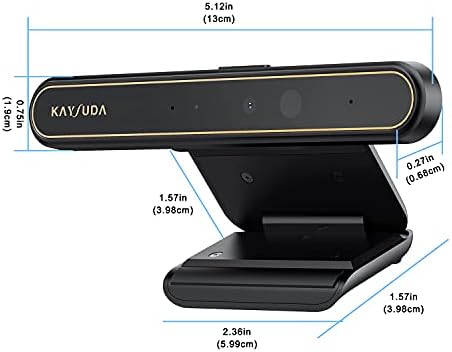
- 1 second High speed recognition login your PC with just facing the Infrared camera. it's better to be plugged in to the PC’s built-in usb port (usb 3.0 recommended) directly to get enough data bandwidth. IR camera+RGB camera+Mic need full usb 2.0 data bandwidth to support work with windows hello. (when plugged on the USB hub or Docking Station it may get the "sorry" error when logging in unless they can supply enough data bandwidth)
- 1080P(Entry Level) RGB web cam with mic for Teams ultra-sharp, Cortana.... Professional quality video, streaming, webcasting and recording
- Multi-user support. Identify users with faces even on shared computer such as family and group. Everyone can easily use account differently.
- Masquerade Detection by Infrared Cam with Depth Sensor. High-Security Biometrics. Masquerade by photos and images can be prevented.
- Push the Privacy Switch, you can Turn On/Off the camera when it is connected to your PC, protect your privacy and Security.
Overview
- Brand : KAYSUDA
- Photo Sensor Technology : CMOS
- Video Capture Resolution : 720p
- Maximum Aperture : 32 f_stop
- Flash Memory Type : Micro SD
- Video Capture Format : MP4
- Supported Audio Format : MP3, AAC
- Screen Size : 2.2 inches
- Connectivity Technology : Infrared, USB
- Color : Black




Work Smarter From Home




WHY WORK BETTER WITH US?

10K+
HAPPY WORKSPACES
10+
HOME OFFICE EXPERIENCE
50+
WORKSPACE COLLECTIONS
1000+
PRODUCTIVITY UPGRADES


WHY UPGRADE YOUR HOME OFFICE?


Home Office Questions
Home Office Tips
-

How to Choose the Best Monitor Light Bar for Yo...
Upgrade your home office lighting with the right monitor light bar. This 2026 buying guide explains how to choose the best LED monitor light bar based on brightness, adjustable color...
How to Choose the Best Monitor Light Bar for Yo...
Upgrade your home office lighting with the right monitor light bar. This 2026 buying guide explains how to choose the best LED monitor light bar based on brightness, adjustable color...
-

How to Choose the Best Under-Desk Drawer Organi...
Maximize your workspace with the right under desk drawer organizer. This 2026 buying guide explains how to choose the best under desk storage solution based on drawer size, storage capacity,...
How to Choose the Best Under-Desk Drawer Organi...
Maximize your workspace with the right under desk drawer organizer. This 2026 buying guide explains how to choose the best under desk storage solution based on drawer size, storage capacity,...
-

How to Choose the Best Desk Mat for Your Home O...
The right desk mat can protect your desktop while creating a cleaner, more comfortable workspace for your keyboard, mouse, laptop, and everyday accessories. This 2026 guide explains how to choose...
How to Choose the Best Desk Mat for Your Home O...
The right desk mat can protect your desktop while creating a cleaner, more comfortable workspace for your keyboard, mouse, laptop, and everyday accessories. This 2026 guide explains how to choose...


