


Redragon M913 Impact Elite Wireless Gaming Mouse, 16000 DPI Wired/Wireless RGB Mouse with 16 Programmable Buttons, 45 Hr Battery and Pro Optical Sensor, 12 Side Buttons MMO Mouse
Redragon M913 Impact Elite Wireless Gaming Mouse, 16000 DPI Wired/Wireless RGB Mouse with 16 Programmable Buttons, 45 Hr Battery and Pro Optical Sensor, 12 Side Buttons MMO Mouse
Couldn't load pickup availability
- 24/7 Customer Support
- Risk-Free 30-Day Returns
- Fast & Reliable U.S. Shipping
Contact Information
Contact Information
30-Day Hassle-Free Returns
30-Day Hassle-Free Returns
Not satisfied? Return your order within 30 days for a full refund or exchange — simple and easy.
✔ Easy return process
✔ Fast refunds
✔ No hidden conditions
Fast U.S. Shipping
Fast U.S. Shipping
We ship within the United States only — no international delays.
✔ Processing time: 1–2 business days
✔ Delivery time: 3–7 business days
✔ Real-time tracking available
👉 Track your order anytime from the header via Track Order
About This
- Wireless/Wired, 2 Ways to Use - Dual modes of 2.4Ghz wireless and USB-C wired mode assemble with 12 side buttons MMO gaming mouse feature. Wireless/wired mode plus easy-access keybinding shortcuts maximize your damage.
- Lightning-Fast Is Not Just Saying - With improved Optical Pixart 3335 gaming sensor, M913 registers each click/swipe instantaneously within 1ms. Efficiency, accuracy and low-latency are all in the box.
- Stay Power-On Day to Night - Low-consumption advanced chip combo with a long lasting battery capacity, guaranteeing its use for long-hours. Eco mode reduces the usage of backlit and levels up the durability of 45 hours (backlit ON) to 80 hours.
- 5 DPIs Designed for Esports - Equipped with 5 onboard DPI levels (1000/2000/4000/8000/16000) which allow you to switch among different needs at ease. Personalizable DPI ± 100 meets your unique need and shorten the get-used-to time.
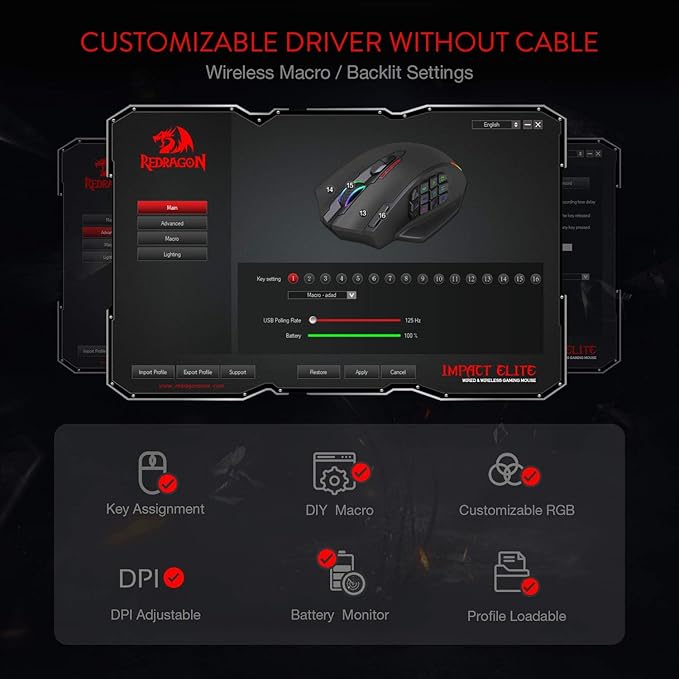
- Uncompromised Driver Support - 16 buttons including 12 side buttons and 16.8 million color lighting effects are all customizable with its own software, even in wireless mode. Ahead to the victory in your exactly wanted way.
Overview
- Brand : Redragon
- Color : Black
- Connectivity Technology : 2.4Ghz Wireless, USB-C
- Special Feature : Programmable Buttons, Wireless
- Movement Detection Technology : Optical




Work Smarter From Home




WHY WORK BETTER WITH US?

10K+
HAPPY WORKSPACES
10+
HOME OFFICE EXPERIENCE
50+
WORKSPACE COLLECTIONS
1000+
PRODUCTIVITY UPGRADES


WHY UPGRADE YOUR HOME OFFICE?


Home Office Questions
Home Office Tips
-

How to Choose the Best Desk Lamp for Your Home ...
The right desk lamp can improve visibility, reduce distracting screen glare, and create a more comfortable home office. This 2026 guide explains how to choose an LED desk lamp based...
How to Choose the Best Desk Lamp for Your Home ...
The right desk lamp can improve visibility, reduce distracting screen glare, and create a more comfortable home office. This 2026 guide explains how to choose an LED desk lamp based...
-

How to Choose the Best Filing Cabinet for a Mor...
Choosing the right filing cabinet can keep important documents organized, secure, and easy to access while reducing home office clutter. This 2026 buyer’s guide explains how to compare filing cabinet...
How to Choose the Best Filing Cabinet for a Mor...
Choosing the right filing cabinet can keep important documents organized, secure, and easy to access while reducing home office clutter. This 2026 buyer’s guide explains how to compare filing cabinet...
-

How to Choose the Best Foot Rest for Your Home ...
A high-quality foot rest can improve posture, reduce pressure on your legs and lower back, and increase comfort during long workdays. This 2026 buyer's guide explains how to compare ergonomic...
How to Choose the Best Foot Rest for Your Home ...
A high-quality foot rest can improve posture, reduce pressure on your legs and lower back, and increase comfort during long workdays. This 2026 buyer's guide explains how to compare ergonomic...


