


XPPen Updated Deco Mini7 V2 Drawing Tablet-16384 Levels of Pressure Battery-Free Stylus, 7 x 4 OSU Drawing Pad, 8 Hotkeys for Digital Art, Teaching, Gaming Graphic Tablet for Chrome, PC, Mac, Android
XPPen Updated Deco Mini7 V2 Drawing Tablet-16384 Levels of Pressure Battery-Free Stylus, 7 x 4 OSU Drawing Pad, 8 Hotkeys for Digital Art, Teaching, Gaming Graphic Tablet for Chrome, PC, Mac, Android
Couldn't load pickup availability
- 24/7 Customer Support
- Risk-Free 30-Day Returns
- Fast & Reliable U.S. Shipping
Contact Information
Contact Information
30-Day Hassle-Free Returns
30-Day Hassle-Free Returns
Not satisfied? Return your order within 30 days for a full refund or exchange — simple and easy.
✔ Easy return process
✔ Fast refunds
✔ No hidden conditions
Fast U.S. Shipping
Fast U.S. Shipping
We ship within the United States only — no international delays.
✔ Processing time: 1–2 business days
✔ Delivery time: 3–7 business days
✔ Real-time tracking available
👉 Track your order anytime from the header via Track Order
About This
- Word-first 16K Pressure Levels: The upgraded stylus offers 16,384 levels of pressure sensitivity for precise control, ideal for detailed artwork. Enhanced nibs ensure longer reliability for aspiring illustrators. The battery-free pen allows for uninterrupted creativity, perfect for students and casual users. With 60° tilt recognition, beginner can easily achieve varied line thicknesses and shading effects
- Beginner -Friendly Updated Driver: Our drawing pad features an updated driver with a simplified UI, ensuring smooth interaction for students, beginner artists, and hobbyists. The straightforward setup allows students to concentrate on their work, while beginners can quickly dive into drawing, boosting their confidence. For hobbyists, the easy operation promotes a relaxed and enjoyable creative process
- Streamlined Creativity with 8 Shortcuts: Our Deco Mini7 V2 features 8 customizable shortcuts designed for both right and left-hand users, making it an ideal tool for students, beginner artists, and hobbyists. These shortcuts streamline your creative process, allowing you to quickly access your favorite tools and functions, which helps you focus on your artwork without interruptions
- OSU!Assistant: Special for OSU! gamer! You do not need to any driver software to use the tablet for OSU! Battery free, sensitive brush, allowing you to play with music and enjoy the game
- Portable Design for On-the-Go Creativity: Our drawing pad measures just 10.2 x 6.3 x 0.36 inches, making it lightweight and ideal for beginners who want to sketch anywhere—at a café, park, or while traveling. With a USB-C connection and included USB to USB-C adapter, you can easily connect to various devices, allowing you to unleash your creativity anytime, anywhere
- Ideal Gift for Beginner Artists: This tablet is highly recommended for those new to drawing, painting, gaming, or editing. It offers a cost-effective way to dive into digital art without the need for expensive traditional supplies. With its intuitive design, this tablet empowers aspiring artists to confidently hone their skills and seamlessly transition into the dynamic world of digital creativity
- Strong Compatibility: XPPen Deco Mini7 V2 computer graphic tablet work with the Windows 7 (or later), Mac OS X 10.10 (or later), Android 10.0 (or later), Harmony OS 2 (or later), Chrome OS 88 (or later), and Linux
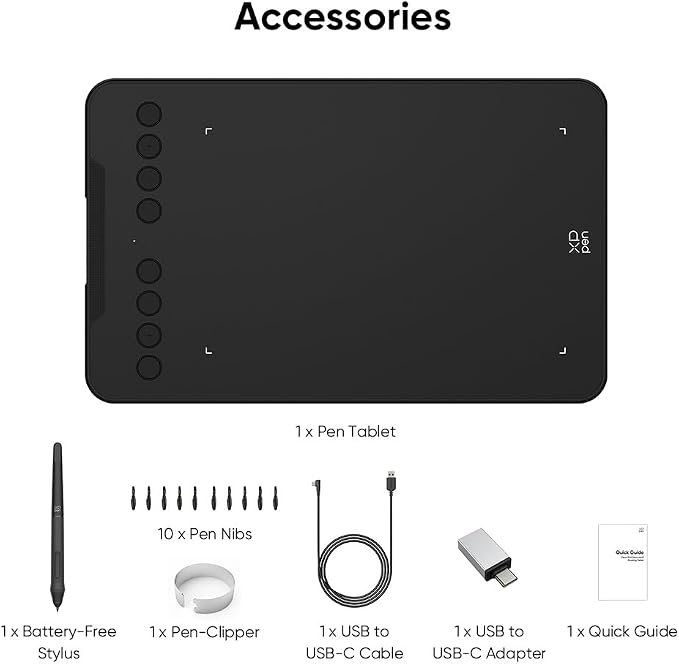
- What You Get: 1 x Deco Mini7 V2 Drawing Tablet, 1 x Stylus, 10 x Nibs, 1 x USB to USB-C Adapter, 1 x USB-C to USB-A Cable
Overview
- Brand : XP-Pen
- Connectivity Technology : USB
- Pressure Sensitivity : 8192 Levels
- Operating System : Windows 7 (or later), Mac OS X 10.10 (or later), Android 10.0 (or later), Harmony OS 2 (or later), Chrome OS 88 (or later), and Linux Windows 7 (or later), Mac OS X 10.10 (or later), Android 10.0 (or later), Harmony OS 2 (or later), Chrome OS 88 (or later), and Linux
- Special Feature : 16,384 levels of pressure sensitivity, 60° Tilt Support, 8 Shortcut Key, OSU Support, Portable Design 16,384 levels of pressure sensitivity, 60° Tilt Support, 8 Shortcut Key, OSU Support, Portable Design




Work Smarter From Home




WHY WORK BETTER WITH US?

10K+
HAPPY WORKSPACES
10+
HOME OFFICE EXPERIENCE
50+
WORKSPACE COLLECTIONS
1000+
PRODUCTIVITY UPGRADES


WHY UPGRADE YOUR HOME OFFICE?


Home Office Questions
Home Office Tips
-

How to Choose the Best Desk Lamp for Your Home ...
The right desk lamp can improve visibility, reduce distracting screen glare, and create a more comfortable home office. This 2026 guide explains how to choose an LED desk lamp based...
How to Choose the Best Desk Lamp for Your Home ...
The right desk lamp can improve visibility, reduce distracting screen glare, and create a more comfortable home office. This 2026 guide explains how to choose an LED desk lamp based...
-

How to Choose the Best Filing Cabinet for a Mor...
Choosing the right filing cabinet can keep important documents organized, secure, and easy to access while reducing home office clutter. This 2026 buyer’s guide explains how to compare filing cabinet...
How to Choose the Best Filing Cabinet for a Mor...
Choosing the right filing cabinet can keep important documents organized, secure, and easy to access while reducing home office clutter. This 2026 buyer’s guide explains how to compare filing cabinet...
-

How to Choose the Best Foot Rest for Your Home ...
A high-quality foot rest can improve posture, reduce pressure on your legs and lower back, and increase comfort during long workdays. This 2026 buyer's guide explains how to compare ergonomic...
How to Choose the Best Foot Rest for Your Home ...
A high-quality foot rest can improve posture, reduce pressure on your legs and lower back, and increase comfort during long workdays. This 2026 buyer's guide explains how to compare ergonomic...


