


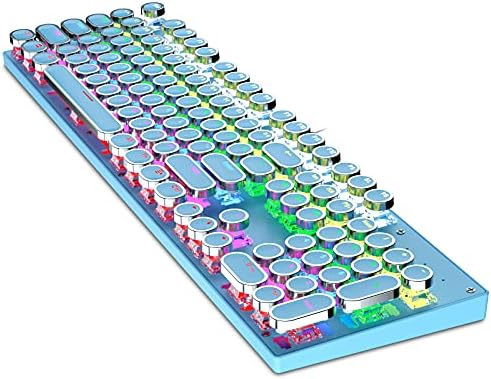
Typewriter Style Mechanical Gaming Keyboard, Blue Retro Punk Gaming Keyboard with 9 True RGB Backlight Modes, 104 Keys Blue Switch Wired Cute Keyboard, Round Keycaps for Windows/Mac/PC
Typewriter Style Mechanical Gaming Keyboard, Blue Retro Punk Gaming Keyboard with 9 True RGB Backlight Modes, 104 Keys Blue Switch Wired Cute Keyboard, Round Keycaps for Windows/Mac/PC
Couldn't load pickup availability
- 24/7 Customer Support
- Risk-Free 30-Day Returns
- Fast & Reliable U.S. Shipping
Contact Information
Contact Information
30-Day Hassle-Free Returns
30-Day Hassle-Free Returns
Not satisfied? Return your order within 30 days for a full refund or exchange — simple and easy.
✔ Easy return process
✔ Fast refunds
✔ No hidden conditions
Fast U.S. Shipping
Fast U.S. Shipping
We ship within the United States only — no international delays.
✔ Processing time: 1–2 business days
✔ Delivery time: 3–7 business days
✔ Real-time tracking available
👉 Track your order anytime from the header via Track Order
About This
- 【104 Key Mechanical Gaming Keyboard】Support full keys without conflict for ultimate Gaming performance. Featuring 12 Multimedia keys, splash-proof Design with adjustable rear feet for the perfect typing angle, High-Speed USB cable with gold-plated corrosion free USB connector for a reliable connection which will stand up to fast hardcore gaming
- 【Rainbow Backlit Punk Keyboard】Press FN+INS to Switch 9 different Lighting modes & effects, 3 backlight brightness levels, adjustable breathing speed. The keycaps offering clear uniform backlighting WIN key can be disabled for gaming. The PC Gaming Keyboard has been ergonomically designed to be a superb typing tool for office work as well
- 【Mechanical Blue Switches】 Offering the best tactile typing experience, also being ever so slightly quieter, fitting for office or gaming use. The switches can be easily
- 【Ergonomic Designed】The Stepped Keycap Makes It Sleek And The Arc And Slope Fit Your Hands Easily To Prevent Fatigue,Designed For Longevity, Durability Delivering Precise Tactile Feedback.
- 【Extensive Compatibility】This typewriter mechanical keyboards use USB 2.0 connector making it compatible with Windows (2000, XP, ME, Vista, 7, 8), Linux and Mac, plug and play, no drivers or software required.
Overview
- Brand : Ltvystore
- Compatible Devices : Gaming Console
- Connectivity Technology : Mini USB
- Keyboard Description : Mechanical
- Recommended Uses For Product : Office
- Special Feature : Round Key
- Color : 104 key blue
- Keyboard backlighting color support : RGB
- Style : Retro
- Material : Plastic




Work Smarter From Home




WHY WORK BETTER WITH US?

10K+
HAPPY WORKSPACES
10+
HOME OFFICE EXPERIENCE
50+
WORKSPACE COLLECTIONS
1000+
PRODUCTIVITY UPGRADES


WHY UPGRADE YOUR HOME OFFICE?


Home Office Questions
Home Office Tips
-

How to Choose the Best Monitor Light Bar for Yo...
Upgrade your home office lighting with the right monitor light bar. This 2026 buying guide explains how to choose the best LED monitor light bar based on brightness, adjustable color...
How to Choose the Best Monitor Light Bar for Yo...
Upgrade your home office lighting with the right monitor light bar. This 2026 buying guide explains how to choose the best LED monitor light bar based on brightness, adjustable color...
-

How to Choose the Best Under-Desk Drawer Organi...
Maximize your workspace with the right under desk drawer organizer. This 2026 buying guide explains how to choose the best under desk storage solution based on drawer size, storage capacity,...
How to Choose the Best Under-Desk Drawer Organi...
Maximize your workspace with the right under desk drawer organizer. This 2026 buying guide explains how to choose the best under desk storage solution based on drawer size, storage capacity,...
-

How to Choose the Best Desk Mat for Your Home O...
The right desk mat can protect your desktop while creating a cleaner, more comfortable workspace for your keyboard, mouse, laptop, and everyday accessories. This 2026 guide explains how to choose...
How to Choose the Best Desk Mat for Your Home O...
The right desk mat can protect your desktop while creating a cleaner, more comfortable workspace for your keyboard, mouse, laptop, and everyday accessories. This 2026 guide explains how to choose...


