


USB to RJ11 Cable for Skywatcher SynScan Computerized GOTO Hand Controller PC to Connect(1.8M)
USB to RJ11 Cable for Skywatcher SynScan Computerized GOTO Hand Controller PC to Connect(1.8M)
Couldn't load pickup availability
- 24/7 Customer Support
- Risk-Free 30-Day Returns
- Fast & Reliable U.S. Shipping
Contact Information
Contact Information
30-Day Hassle-Free Returns
30-Day Hassle-Free Returns
Not satisfied? Return your order within 30 days for a full refund or exchange — simple and easy.
✔ Easy return process
✔ Fast refunds
✔ No hidden conditions
Fast U.S. Shipping
Fast U.S. Shipping
We ship within the United States only — no international delays.
✔ Processing time: 1–2 business days
✔ Delivery time: 3–7 business days
✔ Real-time tracking available
👉 Track your order anytime from the header via Track Order
About This
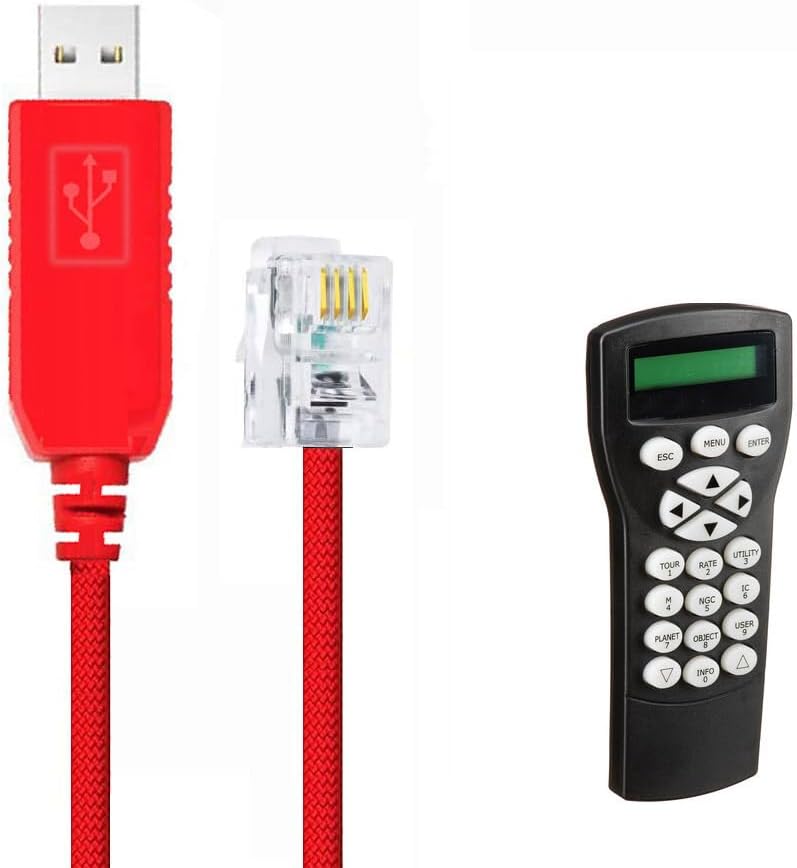
- ✔️【Application Scenes】For connecting PC/Laptop and the Skywatcher Synscan Hand Controller with RJ11 port, to control Skywatcher Telescope via computer. And for upgrading Skywatcher Hand Controller. NOT work with Celestron HC. It is NOT the cable for connecting directly Skywatcher Telescope/Mount and your computer.
- ✔️【Adapter Cable】ONLY control signal. 6FT cable. USB to RJ11 (6P4C) Adapter Cable. Built in FT232RL chip. Please check your Hand Controller brand, model and port before placing an order.
- ✔️【Supported OS】Support all windows version Win7/8/10/XP/, and iOS/Linux/Android. Windows 10 and Ubuntu-Mate 18.04 automatically identify the cable and register the serial port out of the box. If the cable not recognized by your computer, please manually update its driver.
- ✔️【APP & Driver】1. Compatible with ASCOM programs like PHD2 and AstroTortilla, with the EQMOD drivers in Windows (ASCOM) or Linux (INDI), with EQMOD, StellariumScope, and Stellarium, with AstroPhoto Tool program (APT). 2. In order to use EQMOD, you may have to find the new port assigned by Windows, or use the search button on the EQMOD setup screen to find it for you.
- ✔️WARRANTY:Made by Feanteek with 12 months warranty. If you meet any question, please contact us, we will fix your issue within 24 hours.
Overview
- Brand : Feanteek
- Connector Type : Usb
- Cable Type : Serial
- Compatible Devices : PC
- Special Feature : Weaving, High-speed, Non tangled




Work Smarter From Home




WHY WORK BETTER WITH US?

10K+
HAPPY WORKSPACES
10+
HOME OFFICE EXPERIENCE
50+
WORKSPACE COLLECTIONS
1000+
PRODUCTIVITY UPGRADES


WHY UPGRADE YOUR HOME OFFICE?


Home Office Questions
Home Office Tips
-

How to Choose the Best Monitor Light Bar for Yo...
Upgrade your home office lighting with the right monitor light bar. This 2026 buying guide explains how to choose the best LED monitor light bar based on brightness, adjustable color...
How to Choose the Best Monitor Light Bar for Yo...
Upgrade your home office lighting with the right monitor light bar. This 2026 buying guide explains how to choose the best LED monitor light bar based on brightness, adjustable color...
-

How to Choose the Best Under-Desk Drawer Organi...
Maximize your workspace with the right under desk drawer organizer. This 2026 buying guide explains how to choose the best under desk storage solution based on drawer size, storage capacity,...
How to Choose the Best Under-Desk Drawer Organi...
Maximize your workspace with the right under desk drawer organizer. This 2026 buying guide explains how to choose the best under desk storage solution based on drawer size, storage capacity,...
-

How to Choose the Best Desk Mat for Your Home O...
The right desk mat can protect your desktop while creating a cleaner, more comfortable workspace for your keyboard, mouse, laptop, and everyday accessories. This 2026 guide explains how to choose...
How to Choose the Best Desk Mat for Your Home O...
The right desk mat can protect your desktop while creating a cleaner, more comfortable workspace for your keyboard, mouse, laptop, and everyday accessories. This 2026 guide explains how to choose...


