


Powered USB Hub 10Gbps, 10 Port USB 3.2 Gen 2 Hub with 7 USB 3.2 Data Ports, 3 Fast Charging Ports, 36W Power Adapter, Type A and Type C Cable, Aluminum USB Hub for Laptop, Mac, PC
Powered USB Hub 10Gbps, 10 Port USB 3.2 Gen 2 Hub with 7 USB 3.2 Data Ports, 3 Fast Charging Ports, 36W Power Adapter, Type A and Type C Cable, Aluminum USB Hub for Laptop, Mac, PC
Couldn't load pickup availability
- 24/7 Customer Support
- Risk-Free 30-Day Returns
- Fast & Reliable U.S. Shipping
Contact Information
Contact Information
30-Day Hassle-Free Returns
30-Day Hassle-Free Returns
Not satisfied? Return your order within 30 days for a full refund or exchange — simple and easy.
✔ Easy return process
✔ Fast refunds
✔ No hidden conditions
Fast U.S. Shipping
Fast U.S. Shipping
We ship within the United States only — no international delays.
✔ Processing time: 1–2 business days
✔ Delivery time: 3–7 business days
✔ Real-time tracking available
👉 Track your order anytime from the header via Track Order
About This
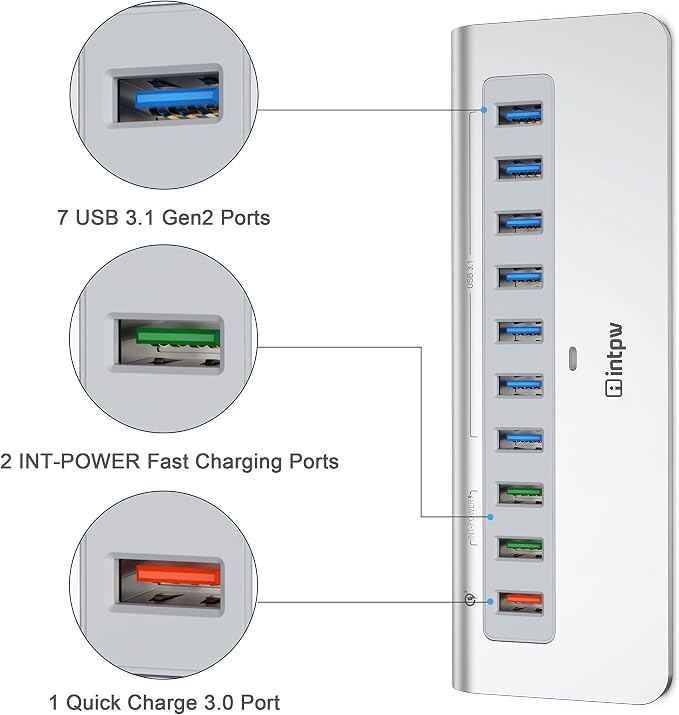
- Hybrid USB 3.2 Hub : Intpw USB 3.2 Gen 2 hub equipped with 7 super speed USB 3.1 (USB 3.2 Gen 2) ports allows you expend multiple USB port for laptop and transfer files at speeds up to 10Gbps, twice the data transmission rate of conventional USB 3.0 in theory. With the ultra-high transfer speed, HD photos, videos and any file transfer can be done in seconds.
- 3 x Fast Charging: The usb port hub equipped with Quick Charge 3.0 port offer a charging power up to 18W and also backwards-compatible with all versions of Qualcomm Quick Charge technology (1.0, 2.0 & 3.0). 2 x INT-POWER fast charging ports using intpw's exclusive charging technology also deliver the fastest possible charge of up to 2.4 amps per port for Qualcomm Quick Charge incompatible devices.
- Powerful 36W Power Adapter: The powered usb hub With a 36W (12V/3A) power adapter, our ensures a stable data transfer and supplies sufficient power for all connected devices. The 10 port usb hub can protect your devices from overload, over-voltage, over-current, short circuit and overcharge, ensuring your safety and efficiency with the built-in surge protector design,ensuring that all usb ports can be connected to devices at the same time.
- Universal Compatibility: The usb hub powered including USB A to A and USB A to C cable in the package, compatible with all USB-A/USB-C laptops and PC, such as M1 Mac mini, MacBook Air/Pro, iMac, XPS, Surface Pro. The usb charging hub powered hub supports hot-swapping, no drivers needed. System requirements: Supports Windows XP/2000/7/8/10/11, Android, Linux, Mac OS 10.3 or above.
- Aluminum Ergonomics Design: The USB hub for PC & computer with aluminum unibody provides premium protection with a slick look and a better heat dissipation. Temperature control under 45℃, The desktop usb hub keep all the USB ports safe and stable during operation. Ergonomics 32-degree angle, saving more effort when you plug and unplug your USB devices and placing more stability on your desk.
Overview
- Brand : intpw
- Color : Silver
- Hardware Interface : Thunderbolt, USB, USB 3.0, USB Type C
- Compatible Devices : All USB-A/USB-C laptops and PC, MacBook Air/Pro, iMac, XPS, Surface Pro, scanners, hard disk drives, projectors, modems, USB flash MP3 players, televisions, keyboards, gaming consoles, DVD routers, desktops, monitors, speakers, printers, tablets, headphones, digital cameras, dashcams, smartphones, card readers. All USB-A/USB-C laptops and PC, MacBook Air/Pro, iMac, XPS, Surface Pro, scanners, hard disk drives, projectors, modems, USB flash MP3 players, televisions, keyboards, gaming consoles, DVD routers, desktops, monitors,… See more
- Total USB Ports : 10




Work Smarter From Home




WHY WORK BETTER WITH US?

10K+
HAPPY WORKSPACES
10+
HOME OFFICE EXPERIENCE
50+
WORKSPACE COLLECTIONS
1000+
PRODUCTIVITY UPGRADES


WHY UPGRADE YOUR HOME OFFICE?


Home Office Questions
Home Office Tips
-

How to Choose the Best Desk Lamp for Your Home ...
The right desk lamp can improve visibility, reduce distracting screen glare, and create a more comfortable home office. This 2026 guide explains how to choose an LED desk lamp based...
How to Choose the Best Desk Lamp for Your Home ...
The right desk lamp can improve visibility, reduce distracting screen glare, and create a more comfortable home office. This 2026 guide explains how to choose an LED desk lamp based...
-

How to Choose the Best Filing Cabinet for a Mor...
Choosing the right filing cabinet can keep important documents organized, secure, and easy to access while reducing home office clutter. This 2026 buyer’s guide explains how to compare filing cabinet...
How to Choose the Best Filing Cabinet for a Mor...
Choosing the right filing cabinet can keep important documents organized, secure, and easy to access while reducing home office clutter. This 2026 buyer’s guide explains how to compare filing cabinet...
-

How to Choose the Best Foot Rest for Your Home ...
A high-quality foot rest can improve posture, reduce pressure on your legs and lower back, and increase comfort during long workdays. This 2026 buyer's guide explains how to compare ergonomic...
How to Choose the Best Foot Rest for Your Home ...
A high-quality foot rest can improve posture, reduce pressure on your legs and lower back, and increase comfort during long workdays. This 2026 buyer's guide explains how to compare ergonomic...


