


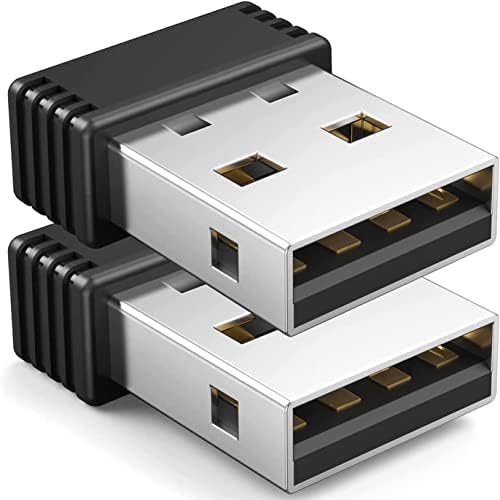
WFB Mouse Jiggler Undetectable 2 Pack, USB Mouse Mover for Laptop/Computer, Auto Keeps PC Awake, Simulates Movement Shaker, Prevents Sleep for Remote Work/Office (No Software)
WFB Mouse Jiggler Undetectable 2 Pack, USB Mouse Mover for Laptop/Computer, Auto Keeps PC Awake, Simulates Movement Shaker, Prevents Sleep for Remote Work/Office (No Software)
Couldn't load pickup availability
- 24/7 Customer Support
- Risk-Free 30-Day Returns
- Fast & Reliable U.S. Shipping
Contact Information
Contact Information
30-Day Hassle-Free Returns
30-Day Hassle-Free Returns
Not satisfied? Return your order within 30 days for a full refund or exchange — simple and easy.
✔ Easy return process
✔ Fast refunds
✔ No hidden conditions
Fast U.S. Shipping
Fast U.S. Shipping
We ship within the United States only — no international delays.
✔ Processing time: 1–2 business days
✔ Delivery time: 3–7 business days
✔ Real-time tracking available
👉 Track your order anytime from the header via Track Order
About This
- [Undetectable & IT-Friendly] – Unlike software or sketchy devices, this MJ01 is recognized as a standard "2.4G Mouse". It looks like a regular peripheral, giving you confidence in keeping your computer awake
- [Slight Shaking] Invisible Movement – Work While It Jiggles – It moves the cursor only 1-2 pixels. You can literally edit a document, watch a movie, or present in a meeting WITHOUT noticing it's working. Stay "Active" without interruption
- [No Software Required] No driver needed to install.It runs directly after being plugged into the computer(it will prompt "install 2.4G Mouse"). Compatible with your original mouse, it will not even affect the regular use
- [Wide Compatibility] Applies for online meetings, games, remote connections, etc. Keep you online all the time. Compatible with Windows, Mac OS, Android system, etc.
- [Ideal for Remote Work & Gaming] – Whether it's a long Zoom meeting, a work-from-home day, or a massive game download overnight, this jiggler helps maintain your active status. Compatible with Windows, Mac, Android, even Raspberry Pi
Overview
- Brand : WFB
- Hardware Interface : USB
- Color : Black
- Compatible Devices : Desktop, Laptop
- Data Link Protocol : USB
- Item Weight : 2 g
- Number of Packs : 2
- Unit Count : 2 Count
- Compatible Operating System Family : MacOS
- Minimum Required Operating System Version : Mac OS 10.12 Sierra




Work Smarter From Home




WHY WORK BETTER WITH US?

10K+
HAPPY WORKSPACES
10+
HOME OFFICE EXPERIENCE
50+
WORKSPACE COLLECTIONS
1000+
PRODUCTIVITY UPGRADES


WHY UPGRADE YOUR HOME OFFICE?


Home Office Questions
Home Office Tips
-

How to Choose the Best Monitor Light Bar for Yo...
Upgrade your home office lighting with the right monitor light bar. This 2026 buying guide explains how to choose the best LED monitor light bar based on brightness, adjustable color...
How to Choose the Best Monitor Light Bar for Yo...
Upgrade your home office lighting with the right monitor light bar. This 2026 buying guide explains how to choose the best LED monitor light bar based on brightness, adjustable color...
-

How to Choose the Best Under-Desk Drawer Organi...
Maximize your workspace with the right under desk drawer organizer. This 2026 buying guide explains how to choose the best under desk storage solution based on drawer size, storage capacity,...
How to Choose the Best Under-Desk Drawer Organi...
Maximize your workspace with the right under desk drawer organizer. This 2026 buying guide explains how to choose the best under desk storage solution based on drawer size, storage capacity,...
-

How to Choose the Best Desk Mat for Your Home O...
The right desk mat can protect your desktop while creating a cleaner, more comfortable workspace for your keyboard, mouse, laptop, and everyday accessories. This 2026 guide explains how to choose...
How to Choose the Best Desk Mat for Your Home O...
The right desk mat can protect your desktop while creating a cleaner, more comfortable workspace for your keyboard, mouse, laptop, and everyday accessories. This 2026 guide explains how to choose...


