


SwitchBot Hub 2 (2nd Gen), Work as a WiFi Thermometer Hygrometer, IR Remote Control, Smart Remote and Light Sensor, Link SwitchBot to Wi-Fi (Support 2.4GHz), Alexa, Google Home, Apple Home Compatible
SwitchBot Hub 2 (2nd Gen), Work as a WiFi Thermometer Hygrometer, IR Remote Control, Smart Remote and Light Sensor, Link SwitchBot to Wi-Fi (Support 2.4GHz), Alexa, Google Home, Apple Home Compatible
Couldn't load pickup availability
- 24/7 Customer Support
- Risk-Free 30-Day Returns
- Fast & Reliable U.S. Shipping
Contact Information
Contact Information
30-Day Hassle-Free Returns
30-Day Hassle-Free Returns
Not satisfied? Return your order within 30 days for a full refund or exchange — simple and easy.
✔ Easy return process
✔ Fast refunds
✔ No hidden conditions
Fast U.S. Shipping
Fast U.S. Shipping
We ship within the United States only — no international delays.
✔ Processing time: 1–2 business days
✔ Delivery time: 3–7 business days
✔ Real-time tracking available
👉 Track your order anytime from the header via Track Order
About This
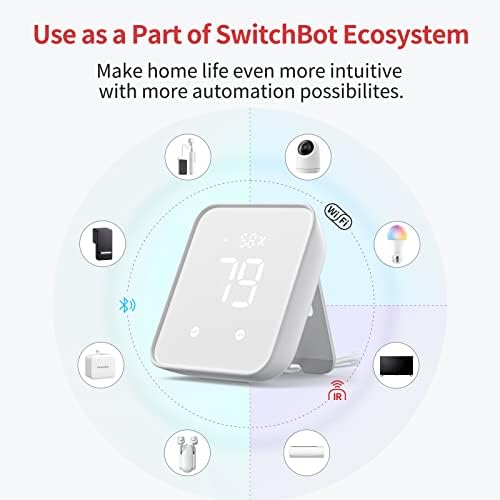
- Smart WiFi Thermometer Hygrometer: The SwitchBot Hub 2 features a built-in industrial Swiss-made chip (accuracy up to ±1.8% RH/±0.36°F) in its cable. Additionally, the panel comes equipped with a light sensor, which enables the screen brightness to adapt to the environment seamlessly. The WiFi functionality allows you to monitor your home's temperature, humidity, and light data, as well as their variations, anytime, anywhere.
- Helps Consolidate All Your Infrared Remotes: With Smart Learning, our smart home hub can help you add tons of home appliance infrared remotes to our app to help make home life simple. You'll then be able to control appliances such as TVs, Air Cons, and more using Voice Commands (e.g. Alexa) or even using our app or your Apple Watch.
- Use with Scenes and Geo-fencing — Temperature, humidity, and light detected by SwitchBot Hub 2 (2nd Gen) can be used as triggers for automatic scenes to control devices like air conditioners. Configure ON/OFF functions strategically when using the “Learn Buttons” method to ensure your air conditioner operates intelligently based on environmental changes.
- 2 Smart Buttons Included: Our device comes with two buttons to allow you to set up household appliances or automation scenes to be controlled when using our app. Just simply tap lightly and enjoy a host of different home automation possibilities, especially suitable for the elderly or children who cannot use smart phones or voice commands.
- Supports Matter: SwitchBot Lock, Curtains and Blind Tilts are supported via Matter when using SwitchBot Hub2 (2nd Gen), which in turn helps make your device supported via HomeKit (support across other devices will come shortly after). Our hub also allows you to use third-party smart assistants such as Alexa, Google Home, and Apple Home for an even better smart home experience.
Overview
- Brand : SwitchBot
- Special Feature : Equipped with a light sensor, that helps your device adapt to the local environment, Supports HomeKit via Matter, The Gateway of SwitchBot Products, link SwitchBot to Wi-Fi (Support 2.4GHz), WiFi, WiFi Smart IR Remote Control Equipped with a light sensor, that helps your device adapt to the local environment, Supports HomeKit via Matter, The Gateway of SwitchBot Products, link SwitchBot to Wi-Fi (Support 2.4GHz),… See more
- Color : White
- Max Number of Supported Devices : 6
- Compatible Devices : Air Conditioner




Work Smarter From Home




WHY WORK BETTER WITH US?

10K+
HAPPY WORKSPACES
10+
HOME OFFICE EXPERIENCE
50+
WORKSPACE COLLECTIONS
1000+
PRODUCTIVITY UPGRADES


WHY UPGRADE YOUR HOME OFFICE?


Home Office Questions
Home Office Tips
-

How to Choose the Best Monitor Light Bar for Yo...
Upgrade your home office lighting with the right monitor light bar. This 2026 buying guide explains how to choose the best LED monitor light bar based on brightness, adjustable color...
How to Choose the Best Monitor Light Bar for Yo...
Upgrade your home office lighting with the right monitor light bar. This 2026 buying guide explains how to choose the best LED monitor light bar based on brightness, adjustable color...
-

How to Choose the Best Under-Desk Drawer Organi...
Maximize your workspace with the right under desk drawer organizer. This 2026 buying guide explains how to choose the best under desk storage solution based on drawer size, storage capacity,...
How to Choose the Best Under-Desk Drawer Organi...
Maximize your workspace with the right under desk drawer organizer. This 2026 buying guide explains how to choose the best under desk storage solution based on drawer size, storage capacity,...
-

How to Choose the Best Desk Mat for Your Home O...
The right desk mat can protect your desktop while creating a cleaner, more comfortable workspace for your keyboard, mouse, laptop, and everyday accessories. This 2026 guide explains how to choose...
How to Choose the Best Desk Mat for Your Home O...
The right desk mat can protect your desktop while creating a cleaner, more comfortable workspace for your keyboard, mouse, laptop, and everyday accessories. This 2026 guide explains how to choose...


