


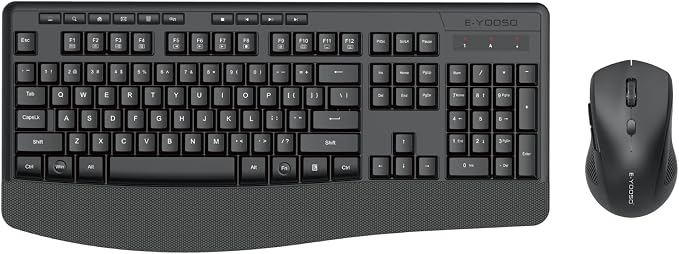
Wireless Keyboard and Mouse Combo, E-YOOSO 2.4GHz Full Sized Ergonomic Wireless Keyboard with Wrist Rest, 3 DPI Adjustable and 6 Buttons Cordless USB Mouse for Computer, Laptop, PC, Windows (Black)
Wireless Keyboard and Mouse Combo, E-YOOSO 2.4GHz Full Sized Ergonomic Wireless Keyboard with Wrist Rest, 3 DPI Adjustable and 6 Buttons Cordless USB Mouse for Computer, Laptop, PC, Windows (Black)
Couldn't load pickup availability
- 24/7 Customer Support
- Risk-Free 30-Day Returns
- Fast & Reliable U.S. Shipping
Contact Information
Contact Information
30-Day Hassle-Free Returns
30-Day Hassle-Free Returns
Not satisfied? Return your order within 30 days for a full refund or exchange — simple and easy.
✔ Easy return process
✔ Fast refunds
✔ No hidden conditions
Fast U.S. Shipping
Fast U.S. Shipping
We ship within the United States only — no international delays.
✔ Processing time: 1–2 business days
✔ Delivery time: 3–7 business days
✔ Real-time tracking available
👉 Track your order anytime from the header via Track Order
About This
- 【COMFORTABLE KEYBOARD MOUSE COMBO】: The wireless keyboard mouse combo has a comfortable touch and typing feel, and keyboard design with palm rest and folding holder, every detail is carefully crafted to fit your hand fully
- 【2.4G STABLE WIRELESS CONNECTION】: No need to install any drivers, E-YOOSO wireless keyboard and mouse use 2.4G wireless connection technology, up to 10m (33 feet), just plug and play, the mouse and keyboard shares the same USB Receiver
- 【POWER SAVING FUNCTION】: The keyboard mouse combo has the function of automatically entering the power-saving, when you stop using the keyboard more than 5 mins, stop using the mouse more than 2 mins, they will enter sleep mode respectively to save power
- 【SPLASH-PROOF DESIGN】: ABS injection molded, stable structure. The panel has built-in a waterproof conductive membrane and multiple drainage holes for double protection. Just shake the keyboard, and the liquid can be smoothly drained out
- 【3 ADJUSTABLE DPI】: This optical wireless mouse with 3 levels adjustable DPI(1000/1600/2400)to meet your different needs in terms of sensitivity by adjusting the DPI button. Wireless optical mouse also can smooth movement even on smooth surfaces
Overview
- Brand : E-YOOSO
- Color : Black
- Connectivity Technology : Usb
- Special Feature : Ergonomic, Wrist Rest
- Compatible Devices : Laptop, Personal Computer, Television




Work Smarter From Home




WHY WORK BETTER WITH US?

10K+
HAPPY WORKSPACES
10+
HOME OFFICE EXPERIENCE
50+
WORKSPACE COLLECTIONS
1000+
PRODUCTIVITY UPGRADES


WHY UPGRADE YOUR HOME OFFICE?


Home Office Questions
Home Office Tips
-

How to Choose the Best Desk Lamp for Your Home ...
The right desk lamp can improve visibility, reduce distracting screen glare, and create a more comfortable home office. This 2026 guide explains how to choose an LED desk lamp based...
How to Choose the Best Desk Lamp for Your Home ...
The right desk lamp can improve visibility, reduce distracting screen glare, and create a more comfortable home office. This 2026 guide explains how to choose an LED desk lamp based...
-

How to Choose the Best Filing Cabinet for a Mor...
Choosing the right filing cabinet can keep important documents organized, secure, and easy to access while reducing home office clutter. This 2026 buyer’s guide explains how to compare filing cabinet...
How to Choose the Best Filing Cabinet for a Mor...
Choosing the right filing cabinet can keep important documents organized, secure, and easy to access while reducing home office clutter. This 2026 buyer’s guide explains how to compare filing cabinet...
-

How to Choose the Best Foot Rest for Your Home ...
A high-quality foot rest can improve posture, reduce pressure on your legs and lower back, and increase comfort during long workdays. This 2026 buyer's guide explains how to compare ergonomic...
How to Choose the Best Foot Rest for Your Home ...
A high-quality foot rest can improve posture, reduce pressure on your legs and lower back, and increase comfort during long workdays. This 2026 buyer's guide explains how to compare ergonomic...


