


Highwings 4K DisplayPort to HDMI Cable Adapter, DP to HDMI Cable Uni-Directional UHD (2K 60Hz, 1080p 120Hz), Display Port Male to HDMI Female Passive, Monitor Converter for Computer, GPU, AMD, NVIDIA
Highwings 4K DisplayPort to HDMI Cable Adapter, DP to HDMI Cable Uni-Directional UHD (2K 60Hz, 1080p 120Hz), Display Port Male to HDMI Female Passive, Monitor Converter for Computer, GPU, AMD, NVIDIA
Couldn't load pickup availability
- 24/7 Customer Support
- Risk-Free 30-Day Returns
- Fast & Reliable U.S. Shipping
Contact Information
Contact Information
30-Day Hassle-Free Returns
30-Day Hassle-Free Returns
Not satisfied? Return your order within 30 days for a full refund or exchange — simple and easy.
✔ Easy return process
✔ Fast refunds
✔ No hidden conditions
Fast U.S. Shipping
Fast U.S. Shipping
We ship within the United States only — no international delays.
✔ Processing time: 1–2 business days
✔ Delivery time: 3–7 business days
✔ Real-time tracking available
👉 Track your order anytime from the header via Track Order
About This
- 4K UHD and AUDIO SYNC: Supports up to 4K@30Hz resolution with backward compatibility for 1440P/2K@60Hz and 1080P Full HD. Ensures synchronized high-definition audio and video for an immersive streaming or gaming experience
- UNI-DIRECTIONAL DISPLAYPORT to HDMI ADAPTER: is designed for one-way conversion from DisplayPort source to HDMI display only. It does not support HDMI to DisplayPort conversion, so it is not suitable for HDMI source devices
- WIDE COMPATIBILITY: Perfect for graphics card (AMD, NVIDIA), laptops (HP, Lenovo), desktops (HP, Dell, Lenovo) with Display Port connections, this cable delivers vibrant, realistic 4K resolution and smooth 3D visuals to large screens
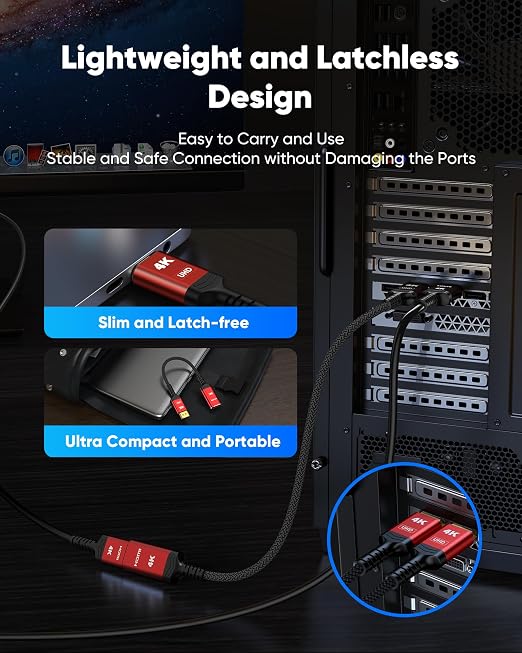
- DURABLE DESIGN: The SR Flexible Strength Design, 24K gold-plated ports, latch-free and military-grade tensile nylon can ensure that this USB-C to HDMI adapter withstand up to 25,000 flex times and accurately transmits signals, greatly extending use life
- NOTE: Please ensure that the display resolution and refresh rate settings are consistent to avoid abnormal display; High-resolution data transmission will cause the chip to heat up, please don't worry too much
Overview
- Compatible Devices : Laptop, Desktop, PC, TV/HDTV, Monitor, Projector, Graphics/Video Card
- Specific Uses For Product : Projector, TV, Monitor
- Connector Type : ['DisplayPort', 'HDMI']
- Color : Red
- Brand : Highwings




Work Smarter From Home




WHY WORK BETTER WITH US?

10K+
HAPPY WORKSPACES
10+
HOME OFFICE EXPERIENCE
50+
WORKSPACE COLLECTIONS
1000+
PRODUCTIVITY UPGRADES


WHY UPGRADE YOUR HOME OFFICE?


Home Office Questions
Home Office Tips
-

How to Choose the Best Desk Lamp for Your Home ...
The right desk lamp can improve visibility, reduce distracting screen glare, and create a more comfortable home office. This 2026 guide explains how to choose an LED desk lamp based...
How to Choose the Best Desk Lamp for Your Home ...
The right desk lamp can improve visibility, reduce distracting screen glare, and create a more comfortable home office. This 2026 guide explains how to choose an LED desk lamp based...
-

How to Choose the Best Filing Cabinet for a Mor...
Choosing the right filing cabinet can keep important documents organized, secure, and easy to access while reducing home office clutter. This 2026 buyer’s guide explains how to compare filing cabinet...
How to Choose the Best Filing Cabinet for a Mor...
Choosing the right filing cabinet can keep important documents organized, secure, and easy to access while reducing home office clutter. This 2026 buyer’s guide explains how to compare filing cabinet...
-

How to Choose the Best Foot Rest for Your Home ...
A high-quality foot rest can improve posture, reduce pressure on your legs and lower back, and increase comfort during long workdays. This 2026 buyer's guide explains how to compare ergonomic...
How to Choose the Best Foot Rest for Your Home ...
A high-quality foot rest can improve posture, reduce pressure on your legs and lower back, and increase comfort during long workdays. This 2026 buyer's guide explains how to compare ergonomic...


