


Portable Monitor Stand with VESA Mount 3inch Bracket Tilt Ball Joint Telescopic Pole and Metal Disk Base Portable Monitor Mount with 75mm VESA Mount FL12B
Portable Monitor Stand with VESA Mount 3inch Bracket Tilt Ball Joint Telescopic Pole and Metal Disk Base Portable Monitor Mount with 75mm VESA Mount FL12B
Couldn't load pickup availability
- 24/7 Customer Support
- Risk-Free 30-Day Returns
- Fast & Reliable U.S. Shipping
Contact Information
Contact Information
30-Day Hassle-Free Returns
30-Day Hassle-Free Returns
Not satisfied? Return your order within 30 days for a full refund or exchange — simple and easy.
✔ Easy return process
✔ Fast refunds
✔ No hidden conditions
Fast U.S. Shipping
Fast U.S. Shipping
We ship within the United States only — no international delays.
✔ Processing time: 1–2 business days
✔ Delivery time: 3–7 business days
✔ Real-time tracking available
👉 Track your order anytime from the header via Track Order
About This
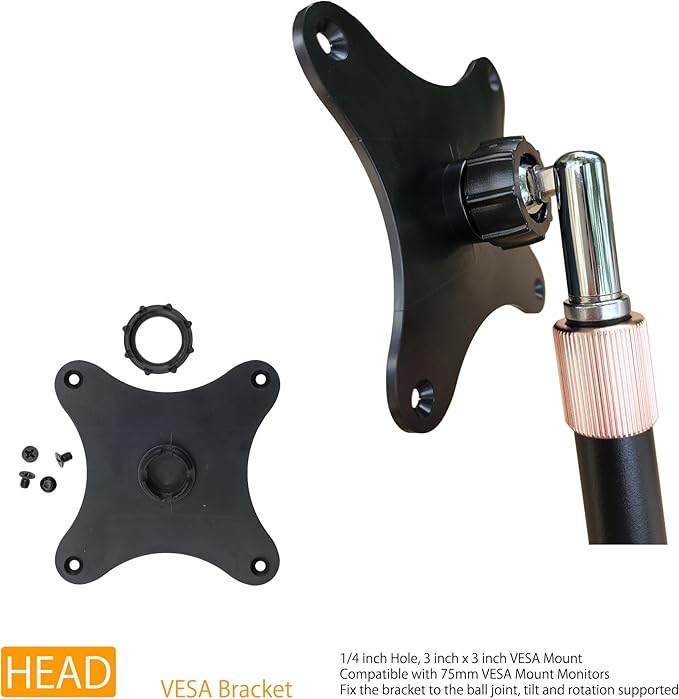
- 𝗩𝗘𝗦𝗔 𝗠𝗼𝘂𝗻𝘁 𝗣𝗼𝗿𝘁𝗮𝗯𝗹𝗲 𝗠𝗼𝗻𝗶𝘁𝗼𝗿 𝗦𝘁𝗮𝗻𝗱: If your portable monitor has a 75mm VESA mount, you definitely need a VESA mount portable monitor stand. The FeeLazy 75mm VESA mount is specially designed for portable monitors, making it perfect for 15.6-inch, 16-inch, 17.3-inch, and 18.5-inch monitors with VESA compatibility. We offer three models with 3-inch VESA mounts: FL11B, FL12B, and FL15B. For desk use, choose FL12B; for desk and travel with extra height, pick FL11B; for edge clamping on the desk, go with FL15B.
- 𝗖𝗼𝗺𝗽𝗮𝗰𝘁 𝗗𝗲𝘀𝗸 𝗦𝗽𝗮𝗰𝗲 𝗦𝗮𝘃𝗲𝗿: With an iron round base diameter of 5.8 inches, this stand for portable monitors takes up minimal desk space while providing solid stability for your tablet or monitor. If your desk is too small for a large monitor, the FL12B portable monitor holder paired with a portable monitor is the best solution. You can even place two monitors side by side, creating a dual-screen setup.
- 𝗔𝗱𝗷𝘂𝘀𝘁𝗮𝗯𝗹𝗲 𝗧𝗲𝗹𝗲𝘀𝗰𝗼𝗽𝗶𝗰 𝗣𝗼𝗹𝗲: The FL12B's telescopic pole extends from 10.6 to 17.2 inches. Fully extended, it allows you to position a monitor above your laptop screen or another portable monitor, creating a vertical dual-screen setup. Regardless of your height, chair, or desk height, you can adjust the FL12B portable monitor stand to find the most comfortable viewing angle and working posture.
- 𝗧𝗶𝗹𝘁 𝗮𝗻𝗱 𝗥𝗼𝘁𝗮𝘁𝗲 𝘄𝗶𝘁𝗵 𝗘𝗮𝘀𝗲: Secure your monitor to the VESA mount bracket with screws and a screwdriver, insert the ball at the end of the pole into the bracket's socket, and tighten the nut. Once mounted on the FL12B stand, you can adjust the tilt and rotate it 360 degrees. Easily switch from horizontal to vertical orientation. When adjusting the tilt angle, pull down the VESA mount to let the nut hold the ball joint, preventing the monitor from slipping due to its weight.
- 𝗩𝗲𝗿𝘀𝗮𝘁𝗶𝗹𝗲 𝗠𝘂𝗹𝘁𝗶-𝗦𝗰𝗿𝗲𝗲𝗻 𝗖𝗼𝗺𝗯𝗶𝗻𝗮𝘁𝗶𝗼𝗻𝘀: FeeLazy's portable monitor stand series includes seven models: FL10A, FL11B, FL11C, FL12B, FL12C, FL15B, and FL15C. These stands enable various multi-screen setups, enhancing your portable monitor experience. Place a portable monitor above your laptop, vertically beside a large monitor, or stack two portable monitors either vertically or horizontally. With FeeLazy portable screen stands, assembling a 4-screen or even 6-screen setup is a breeze.
- Friendly Reminder: The stand may have very minor burrs, scratches, or cosmetic imperfections. These do not affect the functionality or usability of the product. If you have very high expectations regarding the stand's appearance, we do not recommend purchasing this stand.
Overview
- Color : Black
- Material : Alloy Steel
- Brand : FeeLazy
- Item Weight : 0.68 Kilograms
- Finish Type : iron




Work Smarter From Home




WHY WORK BETTER WITH US?

10K+
HAPPY WORKSPACES
10+
HOME OFFICE EXPERIENCE
50+
WORKSPACE COLLECTIONS
1000+
PRODUCTIVITY UPGRADES


WHY UPGRADE YOUR HOME OFFICE?


Home Office Questions
Home Office Tips
-

How to Choose the Best Desk Lamp for Your Home ...
The right desk lamp can improve visibility, reduce distracting screen glare, and create a more comfortable home office. This 2026 guide explains how to choose an LED desk lamp based...
How to Choose the Best Desk Lamp for Your Home ...
The right desk lamp can improve visibility, reduce distracting screen glare, and create a more comfortable home office. This 2026 guide explains how to choose an LED desk lamp based...
-

How to Choose the Best Filing Cabinet for a Mor...
Choosing the right filing cabinet can keep important documents organized, secure, and easy to access while reducing home office clutter. This 2026 buyer’s guide explains how to compare filing cabinet...
How to Choose the Best Filing Cabinet for a Mor...
Choosing the right filing cabinet can keep important documents organized, secure, and easy to access while reducing home office clutter. This 2026 buyer’s guide explains how to compare filing cabinet...
-

How to Choose the Best Foot Rest for Your Home ...
A high-quality foot rest can improve posture, reduce pressure on your legs and lower back, and increase comfort during long workdays. This 2026 buyer's guide explains how to compare ergonomic...
How to Choose the Best Foot Rest for Your Home ...
A high-quality foot rest can improve posture, reduce pressure on your legs and lower back, and increase comfort during long workdays. This 2026 buyer's guide explains how to compare ergonomic...


