


Yottamaster USB Hub with SD Card Reader, Triangle Desktop USB3.0 Hub with 3 USB A 3.0 Ports, TF & SD Card Reader with 1.64ft Cable for PC, Laptop (Not Support Charging)
Yottamaster USB Hub with SD Card Reader, Triangle Desktop USB3.0 Hub with 3 USB A 3.0 Ports, TF & SD Card Reader with 1.64ft Cable for PC, Laptop (Not Support Charging)
Couldn't load pickup availability
- 24/7 Customer Support
- Risk-Free 30-Day Returns
- Fast & Reliable U.S. Shipping
Contact Information
Contact Information
30-Day Hassle-Free Returns
30-Day Hassle-Free Returns
Not satisfied? Return your order within 30 days for a full refund or exchange — simple and easy.
✔ Easy return process
✔ Fast refunds
✔ No hidden conditions
Fast U.S. Shipping
Fast U.S. Shipping
We ship within the United States only — no international delays.
✔ Processing time: 1–2 business days
✔ Delivery time: 3–7 business days
✔ Real-time tracking available
👉 Track your order anytime from the header via Track Order
About This
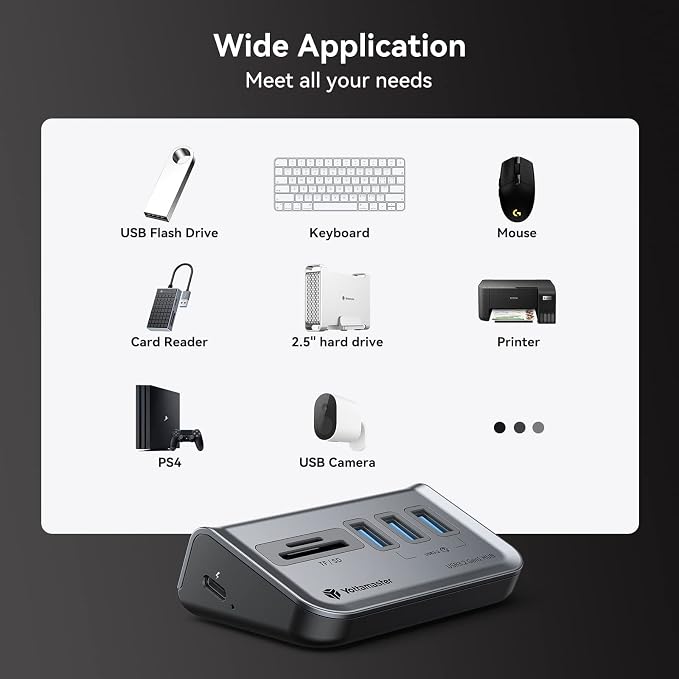
- 【Expand Your Devices with Ease】This USB 3.0 hub effortlessly expands your device's connectivity with 3 USB-A 3.2 GEN1 ports (5Gbps), 1 TF slot, and 1 SD slot, ensuring seamless connectivity. The card reader slot includes SD and micro SD card reader slots, allowing for easy reading of SDHC, SD, Micro SDXC, Micro SDHC, Micro SD, and MMC cards.
- 【Ergonomic 34° Slope Design】The device incorporates a 34-degree ergonomic slope design, enhancing convenience when it comes to plugging and unplugging. You can conveniently stick it to your PC or desktop, making it easily accessible for seamless use.
- 【5Gbps USB 3.2 Gen1 Protocol】Experience lightning-fast data transfer speeds of up to 5Gbps with the USB 3.2 Gen1 transmission protocol. This usb hub with sd card reader features a reserved USB-C 5V power supply interface, allowing you to connect a 5V 2A power source to ensure sufficient power for high-power USB devices to function properly.
- 【Plug-and-Play Compatibility】This hub supports hot-plugging and requires no drivers, making it compatible with Windows, Mac. Equipped with a USB-C to USB-C data cable and a USB-A adapter, it allows for the use of various USB-A and USB-C devices.
- 【ABS Material for Durability】The use of ABS material in this USB 3.0 hub ensures durability, a lightweight design, and electrical insulation. Its robust build enables it to withstand daily wear and tear, ensuring long-lasting performance. Its portability makes it convenient to carry around, adding minimal weight to your setup or when you are on the go with your devices.
- 【What you get】The packaging includes one USB 3.0 hub with sd card reader, a data cable, and an instruction manual. The USB 3.0 hub is primarily used for expanding USB interfaces and facilitating data transmission. It does not support device charging, and not include a power adapter.
Overview
- Brand : Yottamaster
- Color : Grey
- Hardware Interface : USB Type C
- Special Feature : Fast Data Transfer, Plug and Play, Powered
- Compatible Devices : Card Readers, Desktops, Keyboards, Laptops, Mouse




Work Smarter From Home




WHY WORK BETTER WITH US?

10K+
HAPPY WORKSPACES
10+
HOME OFFICE EXPERIENCE
50+
WORKSPACE COLLECTIONS
1000+
PRODUCTIVITY UPGRADES


WHY UPGRADE YOUR HOME OFFICE?


Home Office Questions
Home Office Tips
-

How to Choose the Best Desk Lamp for Your Home ...
The right desk lamp can improve visibility, reduce distracting screen glare, and create a more comfortable home office. This 2026 guide explains how to choose an LED desk lamp based...
How to Choose the Best Desk Lamp for Your Home ...
The right desk lamp can improve visibility, reduce distracting screen glare, and create a more comfortable home office. This 2026 guide explains how to choose an LED desk lamp based...
-

How to Choose the Best Filing Cabinet for a Mor...
Choosing the right filing cabinet can keep important documents organized, secure, and easy to access while reducing home office clutter. This 2026 buyer’s guide explains how to compare filing cabinet...
How to Choose the Best Filing Cabinet for a Mor...
Choosing the right filing cabinet can keep important documents organized, secure, and easy to access while reducing home office clutter. This 2026 buyer’s guide explains how to compare filing cabinet...
-

How to Choose the Best Foot Rest for Your Home ...
A high-quality foot rest can improve posture, reduce pressure on your legs and lower back, and increase comfort during long workdays. This 2026 buyer's guide explains how to compare ergonomic...
How to Choose the Best Foot Rest for Your Home ...
A high-quality foot rest can improve posture, reduce pressure on your legs and lower back, and increase comfort during long workdays. This 2026 buyer's guide explains how to compare ergonomic...


