


USB C Hub, Pink 8-in-1 Type C Multiport Adapter with 4K@60Hz HDMI, 100W PD, 5Gbps 1xUSB-C, 3xUSB-A 3.0, SD/TF Slots & RGB Lighting, Pink USB Hub for MacBook Air/Pro, iPad, iMac, Surface, XPS
USB C Hub, Pink 8-in-1 Type C Multiport Adapter with 4K@60Hz HDMI, 100W PD, 5Gbps 1xUSB-C, 3xUSB-A 3.0, SD/TF Slots & RGB Lighting, Pink USB Hub for MacBook Air/Pro, iPad, iMac, Surface, XPS
Couldn't load pickup availability
- 24/7 Customer Support
- Risk-Free 30-Day Returns
- Fast & Reliable U.S. Shipping
Contact Information
Contact Information
30-Day Hassle-Free Returns
30-Day Hassle-Free Returns
Not satisfied? Return your order within 30 days for a full refund or exchange — simple and easy.
✔ Easy return process
✔ Fast refunds
✔ No hidden conditions
Fast U.S. Shipping
Fast U.S. Shipping
We ship within the United States only — no international delays.
✔ Processing time: 1–2 business days
✔ Delivery time: 3–7 business days
✔ Real-time tracking available
👉 Track your order anytime from the header via Track Order
About This
- 8-in-1 Vertical USB-C Hub with RGB: Equipped with a 4K@60Hz HDMI port, a high-speed 5Gbps USB-C data port, 3 x 5Gbps USB-A 3.0 ports, a 100W PD port, an SD/MicroSD card reader, and RGB lighting that supports dynamic color modes. This pink docking station boasts a sleek and ambiance-enhancing design. Its 1.6ft (48cm) USB-C cable provides ample length for laptop setups, while the vertical design maximizes desk space.
- Two stable placement options: 1) Tool-free adhesive mounting – no drilling needed! Just peel off the bottom strip to easily & quickly secure the pink USB-C hub to your desk. 2) A non-slip base ensures stability. It stays steady even with multiple cables connected. Better still, unlike one-time adhesive strips, it lets you reposition anytime—adding extra flexibility to your setup.
- Power Delivery (100W) Charging: With your 100W wall charger and cable, this pink type c hub delivers up to 85W pass-through charging, ensuring your laptop stay powered while you work. (Note: PD-IN port for pass-through charging only, no data transfer. We recommend using a 45W charger for MacBook Air/iPad compatibility.)
- Vivid 4K HDMI Output: The pink USB C macbook air adapter hub’s 4K @60Hz HDMI output lets you extend or mirror your screen to a TV, projector, or monitor in stunning detail. Ideal for work presentations, team meetings, or movie nights with friends. (Please check that your device's USB-C port supports DP-ALT mode for full functionality.)
- Super-Fast Data Transfer: Transfer large files in seconds with USB C Hub pink. Equipped with USB-C and three USB 3.0 ports, it supports data speeds up to 5 Gbps. Quickly connect external peripherals for macbook, like drives, mouses, keyboards or microSD/SD cards with read speeds up to 104 Mbps. Boost productivity with seamless data management.
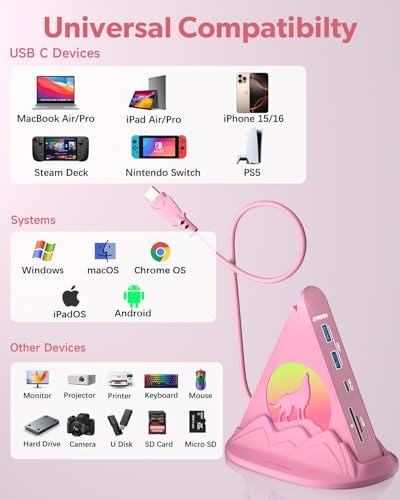
- Ergonomic & Compatible Design: The 8-in-1 Pink USB C desktop Hub has an ergonomic design for easy plugging/unplugging.It’s plug-and-play (no drivers needed), compatible with Windows, macOS, Chrome OS, iPadOS, Android, and works with devices like MacBook Air/Pro, iPad, Surface Pro, Chromebook, Dell XPS, Lenovo, Samsung, Nintendo Switch, PS5, Xbox Series X/S, and more full-functional type-c devices.
- What You’ll Get: Joyreken Wolf USB-C Hub 8-in-1 with Base-Stand (Plastic Material), Welcome Guide, 12-Month Worry-Free Warranty, and friendly customer support.
Overview
- Brand : JoyReken
- Color : 2-Pink Wolf With Base
- Hardware Interface : HDMI, MicroSD, USB, USB 3.0, USB Type C
- Special Feature : Anti-Slip, Fast Data Transfer, Indicator Light, Pass Through Charge, Plug and Play
- Compatible Devices : MacBook Air/Pro, Surface Pro 7/Book 2/Go, XPS, Laptops with USB4, or Thunderbolt 3/4/5, or the USB-C port that support DP-Alt Mode, Power Delivery and Data Transfer, iMac, iPad, iPhone 15/16/17 MacBook Air/Pro, Surface Pro 7/Book 2/Go, XPS, Laptops with USB4, or Thunderbolt 3/4/5, or the USB-C port that support DP-Alt Mode, Power Delivery and Data Transfer, iMac, iPad, iPhone 15/16/17




Work Smarter From Home




WHY WORK BETTER WITH US?

10K+
HAPPY WORKSPACES
10+
HOME OFFICE EXPERIENCE
50+
WORKSPACE COLLECTIONS
1000+
PRODUCTIVITY UPGRADES


WHY UPGRADE YOUR HOME OFFICE?


Home Office Questions
Home Office Tips
-

How to Choose the Best Monitor Light Bar for Yo...
Upgrade your home office lighting with the right monitor light bar. This 2026 buying guide explains how to choose the best LED monitor light bar based on brightness, adjustable color...
How to Choose the Best Monitor Light Bar for Yo...
Upgrade your home office lighting with the right monitor light bar. This 2026 buying guide explains how to choose the best LED monitor light bar based on brightness, adjustable color...
-

How to Choose the Best Under-Desk Drawer Organi...
Maximize your workspace with the right under desk drawer organizer. This 2026 buying guide explains how to choose the best under desk storage solution based on drawer size, storage capacity,...
How to Choose the Best Under-Desk Drawer Organi...
Maximize your workspace with the right under desk drawer organizer. This 2026 buying guide explains how to choose the best under desk storage solution based on drawer size, storage capacity,...
-

How to Choose the Best Desk Mat for Your Home O...
The right desk mat can protect your desktop while creating a cleaner, more comfortable workspace for your keyboard, mouse, laptop, and everyday accessories. This 2026 guide explains how to choose...
How to Choose the Best Desk Mat for Your Home O...
The right desk mat can protect your desktop while creating a cleaner, more comfortable workspace for your keyboard, mouse, laptop, and everyday accessories. This 2026 guide explains how to choose...


