


ToLuLu Streaming Webcam 2K 50FPS Web Cam, LED RGB Webcam with Microphone and Light, Autofocus Computer Camera with Cover and Tripod, Plug-Play USB Web cam for PC Desktop/MacBook Gaming Video Calling
ToLuLu Streaming Webcam 2K 50FPS Web Cam, LED RGB Webcam with Microphone and Light, Autofocus Computer Camera with Cover and Tripod, Plug-Play USB Web cam for PC Desktop/MacBook Gaming Video Calling
Couldn't load pickup availability
- 24/7 Customer Support
- Risk-Free 30-Day Returns
- Fast & Reliable U.S. Shipping
Contact Information
Contact Information
30-Day Hassle-Free Returns
30-Day Hassle-Free Returns
Not satisfied? Return your order within 30 days for a full refund or exchange — simple and easy.
✔ Easy return process
✔ Fast refunds
✔ No hidden conditions
Fast U.S. Shipping
Fast U.S. Shipping
We ship within the United States only — no international delays.
✔ Processing time: 1–2 business days
✔ Delivery time: 3–7 business days
✔ Real-time tracking available
👉 Track your order anytime from the header via Track Order
About This
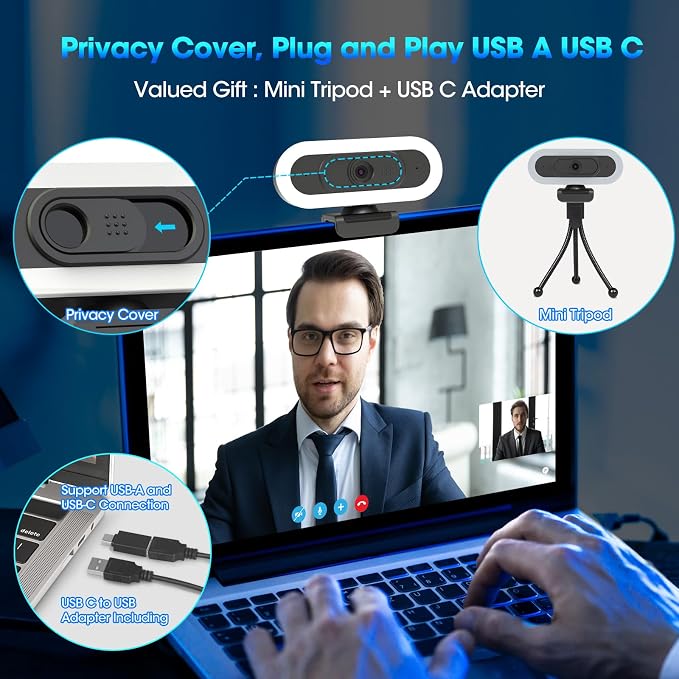
- 【Adjustable Ring Light Webcam】 When you connect the webcam to computer and start the video software, the camera will provide 7 LED Lights RGB automatically, perfect for streaming gaming, Must have for gamer fans to build a dream setup. Touch the back to switch to white light with 3 Levels of brightness, you can choose the ideal light, no need to worry about glare. It can help light up your scene even in dim light environments. great for business meeting,online learning or video calling
- 【QHD 2K Webcam Streaming Camera】with 4 megapixel sensor, supply 3 different resolutions( 2K, 1080p, 720p):2k@50fps, 1080p@60fps,720p@60fps, Fast 50fps/60fps frame rate for smooth live footage, improved video performance, this webcam also can supply 30fps (1440P/30fps,1080p/30fps and 720p/30fps) , create crystal-clear image.Perfect for gaming/streaming/video calling/conferencing /Recording /online school /Zoom / Facetime / Video Calling / OBS / Twitch / Facebook / YouTube / Xbox one
- 【Built-in Microphone & Autofocus】Built-in dual omnidirectional mics with noise cancellation ensure that you get clear audio from every angle, picking up our voice within 16.4ft and filtering out background noise for barrier-free communication. The intelligent autofocus webcam provides you never have to worry about adjusting the focal length. It always automatically finds the optimal focal distance for your scene
- 【65° angle and Privacy Cover for safety】The stream web cam has a 65° narrow-angle lens, without showing much background and how messy in your office or room, it greatly protects your privacy. Also, the pc webcam comes with a privacy cover that allows you to enjoy a secure digital web life when not in use and prevents hackers from prying into your privacy
- 【Upgraded USB Gaming Webcam】Plug-and-Play & USB Connectivity – No driver required. The 2K streaming webcam features both USB Type-A & A-to-C Adapter connections, offering wider compatibility compared to the previous model, which only supported USB Type-A.Cable Length 5.9ft,Compability with Windows 7/8/10/11 or above, macOS 10.10 or above with UVC support, Chrome OS with UVC support, Android 5.0 or above, Operating systems with standard UVC/UAC drivers
- 【Flexible Design & Tripod Stand】Easily set up your webcam with the equipped tripod or use the built-in clip to attach the webcam directly to your devices. The ToLuLu 2K webcam features a universal joint for 360° horizontal rotation, 15° vertical adjustment and a 180° adjustable stand
Overview
- Brand : ToLuLu
- Photo Sensor Technology : CMOS
- Video Capture Resolution : 2K
- Flash Memory Type : Internal flash memory
- Video Capture Format : MP4
- Supported Audio Format : AAC
- Connectivity Technology : USB
- Color : Colorful RGB
- Special Feature : Adjustable Ring Light Webcam, Built-in Microphone & Autofocus
- Camcorder type : Webcam




Work Smarter From Home




WHY WORK BETTER WITH US?

10K+
HAPPY WORKSPACES
10+
HOME OFFICE EXPERIENCE
50+
WORKSPACE COLLECTIONS
1000+
PRODUCTIVITY UPGRADES


WHY UPGRADE YOUR HOME OFFICE?


Home Office Questions
Home Office Tips
-

How to Choose the Best Desk Lamp for Your Home ...
The right desk lamp can improve visibility, reduce distracting screen glare, and create a more comfortable home office. This 2026 guide explains how to choose an LED desk lamp based...
How to Choose the Best Desk Lamp for Your Home ...
The right desk lamp can improve visibility, reduce distracting screen glare, and create a more comfortable home office. This 2026 guide explains how to choose an LED desk lamp based...
-

How to Choose the Best Filing Cabinet for a Mor...
Choosing the right filing cabinet can keep important documents organized, secure, and easy to access while reducing home office clutter. This 2026 buyer’s guide explains how to compare filing cabinet...
How to Choose the Best Filing Cabinet for a Mor...
Choosing the right filing cabinet can keep important documents organized, secure, and easy to access while reducing home office clutter. This 2026 buyer’s guide explains how to compare filing cabinet...
-

How to Choose the Best Foot Rest for Your Home ...
A high-quality foot rest can improve posture, reduce pressure on your legs and lower back, and increase comfort during long workdays. This 2026 buyer's guide explains how to compare ergonomic...
How to Choose the Best Foot Rest for Your Home ...
A high-quality foot rest can improve posture, reduce pressure on your legs and lower back, and increase comfort during long workdays. This 2026 buyer's guide explains how to compare ergonomic...


