


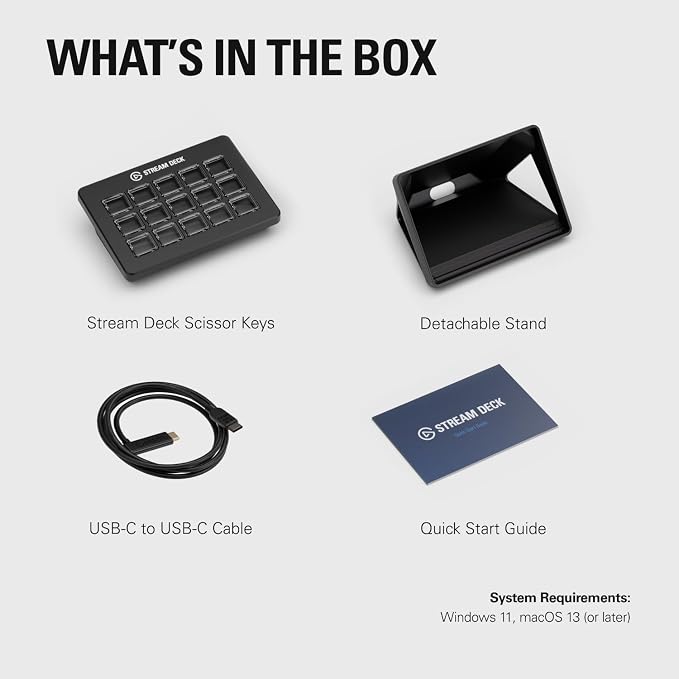
Elgato Stream Deck Scissor Keys Workflow Controller | Tactile, responsive macro keys, Monitor CPU, GPU, ping, FPS, LED-lit icons, Regular plugin updates, Windows and macOS
Elgato Stream Deck Scissor Keys Workflow Controller | Tactile, responsive macro keys, Monitor CPU, GPU, ping, FPS, LED-lit icons, Regular plugin updates, Windows and macOS
Couldn't load pickup availability
- 24/7 Customer Support
- Risk-Free 30-Day Returns
- Fast & Reliable U.S. Shipping
Contact Information
Contact Information
30-Day Hassle-Free Returns
30-Day Hassle-Free Returns
Not satisfied? Return your order within 30 days for a full refund or exchange — simple and easy.
✔ Easy return process
✔ Fast refunds
✔ No hidden conditions
Fast U.S. Shipping
Fast U.S. Shipping
We ship within the United States only — no international delays.
✔ Processing time: 1–2 business days
✔ Delivery time: 3–7 business days
✔ Real-time tracking available
👉 Track your order anytime from the header via Track Order
About This
- Sharper Key Feel: Every click is tactile and responsive, ideal for fast-paced macro commands
- Control Everything: Launch Discord, games, OBS scenes, or mute with one tap—no alt-tab needed
- Monitor in Real Time: Assign keys to display CPU, GPU, ping, FPS, or system stats at a glance
- No Guesswork: LED-lit keys show icons clearly, so you can react fast without looking away
- Stay Updated: Get new plugins, features, and community support with regular updates
Overview
- Brand : Elgato
- Compatible Devices : PC
- Connectivity Technology : USB-C
- Keyboard Description : Gaming
- Recommended Uses For Product : Gaming
- Special Feature : Customizable Display Keys, Integrated Stand, Programmable Keys
- Color : Black
- Keyboard backlighting color support : RGB
- Style : Stream Deck Scissor Keys
- Product Dimensions : 4.65"L x 3.31"W x 1.18"H




Work Smarter From Home




WHY WORK BETTER WITH US?

10K+
HAPPY WORKSPACES
10+
HOME OFFICE EXPERIENCE
50+
WORKSPACE COLLECTIONS
1000+
PRODUCTIVITY UPGRADES


WHY UPGRADE YOUR HOME OFFICE?


Home Office Questions
Home Office Tips
-

Standing Desk vs Ergonomic Chair | Home Office ...
Learn whether a standing desk or ergonomic chair should be your first home office upgrade for better posture, comfort, productivity, and healthier daily work habits.
Standing Desk vs Ergonomic Chair | Home Office ...
Learn whether a standing desk or ergonomic chair should be your first home office upgrade for better posture, comfort, productivity, and healthier daily work habits.
-

Small Home Office Ideas | Space-Saving Workspac...
Learn how to create a productive small home office with smarter storage, ergonomic furniture, better lighting, and space-saving organization ideas.
Small Home Office Ideas | Space-Saving Workspac...
Learn how to create a productive small home office with smarter storage, ergonomic furniture, better lighting, and space-saving organization ideas.
-

Ergonomic Home Office Setup Guide | Comfort & P...
Modern ergonomic home office setup with comfortable chair, proper monitor height, and productivity-focused workspace
Ergonomic Home Office Setup Guide | Comfort & P...
Modern ergonomic home office setup with comfortable chair, proper monitor height, and productivity-focused workspace


