


Dual VESA Panel Mini PC Expansion Board Monitor Bracket
Dual VESA Panel Mini PC Expansion Board Monitor Bracket
Couldn't load pickup availability
- 24/7 Customer Support
- Risk-Free 30-Day Returns
- Fast & Reliable U.S. Shipping
Contact Information
Contact Information
30-Day Hassle-Free Returns
30-Day Hassle-Free Returns
Not satisfied? Return your order within 30 days for a full refund or exchange — simple and easy.
✔ Easy return process
✔ Fast refunds
✔ No hidden conditions
Fast U.S. Shipping
Fast U.S. Shipping
We ship within the United States only — no international delays.
✔ Processing time: 1–2 business days
✔ Delivery time: 3–7 business days
✔ Real-time tracking available
👉 Track your order anytime from the header via Track Order
About This
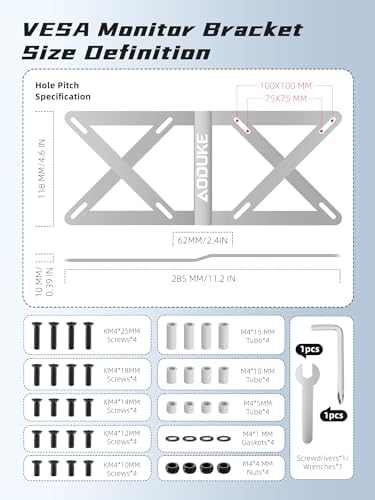
- 1.Expand Your VESA Mount Functionality – Instantly add a second VESA mounting plate to your monitor! Perfect for securely mounting mini PCs (up to 280mm width) behind your screen for a clean and space-saving setup.
- 2.Universal Compatibility – Fits any monitor or arm with 75x75mm or 100x100mm VESA patterns. Works even if your monitor is already mounted on an arm or stand.
- 3.Heavy-Duty Steel Construction – Made from premium carbon steel, this solid all-metal bracket measures 11.2 x 4.6 x 0.39 inches and supports up to 33 lbs – built to last and keep your mini PC secure.
- 4.Directly compatible devices:(not a full list) NUC5 NUC6 NUC7 NUC8 NUC10,NUC12 13 14 PRO,OptiPlex 7020 7000 micro PC,EliteDesk ProDesk 600 705 800 900 Mini PC. M70 M75 M90 Mini PC,PN40 PN50 PN62 PB62 Chromebox 3 5,G2 G3 G9 K3/G6 M7 M6 M5 M3 N97 N100 N150,EQR5 EQR6/EQI12 EQI15 S8 S13 S12 ER5 GTI13 GTI14,GK3Plus,AM06. U700 N40 GK41, P4 B100 B95 Mini PC, commonly these models come with VESA screw holes and expansion boards that can be directly adapted!
- 5. Can not be directly compatible with the device: (not a full list) Mac Mini, In tel NUC Extreme/Rugged, Gee kom IT8, Trigkey S5, Ace Magic F3A, Pel adn 7840HS common these models do not have VESA holes need to be additional with the expansion board, this product does not contain! This product does not include the expansion board, if you need to use it, you need to prepare it by yourself!
- 6.Complete Installation Kit Included – Comes with extension plate, screwdriver, wrench, and M4 screws in multiple lengths (10/12/14/18/25mm) to match different mounting scenarios. Easy setup in minutes.
Overview
- Color : Silver VESA Monitor Bracket
- Brand : AODUKE
- Material : Carbon Steel
- Item dimensions L x W x H : 11.2 x 4.6 x 0.39 inches
- Item Weight : 0.25 kg




Work Smarter From Home




WHY WORK BETTER WITH US?

10K+
HAPPY WORKSPACES
10+
HOME OFFICE EXPERIENCE
50+
WORKSPACE COLLECTIONS
1000+
PRODUCTIVITY UPGRADES


WHY UPGRADE YOUR HOME OFFICE?


Home Office Questions
Home Office Tips
-

How to Choose the Best Monitor Light Bar for Yo...
Upgrade your home office lighting with the right monitor light bar. This 2026 buying guide explains how to choose the best LED monitor light bar based on brightness, adjustable color...
How to Choose the Best Monitor Light Bar for Yo...
Upgrade your home office lighting with the right monitor light bar. This 2026 buying guide explains how to choose the best LED monitor light bar based on brightness, adjustable color...
-

How to Choose the Best Under-Desk Drawer Organi...
Maximize your workspace with the right under desk drawer organizer. This 2026 buying guide explains how to choose the best under desk storage solution based on drawer size, storage capacity,...
How to Choose the Best Under-Desk Drawer Organi...
Maximize your workspace with the right under desk drawer organizer. This 2026 buying guide explains how to choose the best under desk storage solution based on drawer size, storage capacity,...
-

How to Choose the Best Desk Mat for Your Home O...
The right desk mat can protect your desktop while creating a cleaner, more comfortable workspace for your keyboard, mouse, laptop, and everyday accessories. This 2026 guide explains how to choose...
How to Choose the Best Desk Mat for Your Home O...
The right desk mat can protect your desktop while creating a cleaner, more comfortable workspace for your keyboard, mouse, laptop, and everyday accessories. This 2026 guide explains how to choose...


