


WIRWTRU USB Hub 7 Port,USB 3.0 Hub Splitter for Office,Home,School | Individual On/Off LED Switches, USB Hub for PC, 5Gbps HighSpeed Data for Laptop, Mac, PC, Desktop, PS5, Xbox
WIRWTRU USB Hub 7 Port,USB 3.0 Hub Splitter for Office,Home,School | Individual On/Off LED Switches, USB Hub for PC, 5Gbps HighSpeed Data for Laptop, Mac, PC, Desktop, PS5, Xbox
Couldn't load pickup availability
- 24/7 Customer Support
- Risk-Free 30-Day Returns
- Fast & Reliable U.S. Shipping
Contact Information
Contact Information
30-Day Hassle-Free Returns
30-Day Hassle-Free Returns
Not satisfied? Return your order within 30 days for a full refund or exchange — simple and easy.
✔ Easy return process
✔ Fast refunds
✔ No hidden conditions
Fast U.S. Shipping
Fast U.S. Shipping
We ship within the United States only — no international delays.
✔ Processing time: 1–2 business days
✔ Delivery time: 3–7 business days
✔ Real-time tracking available
👉 Track your order anytime from the header via Track Order
About This
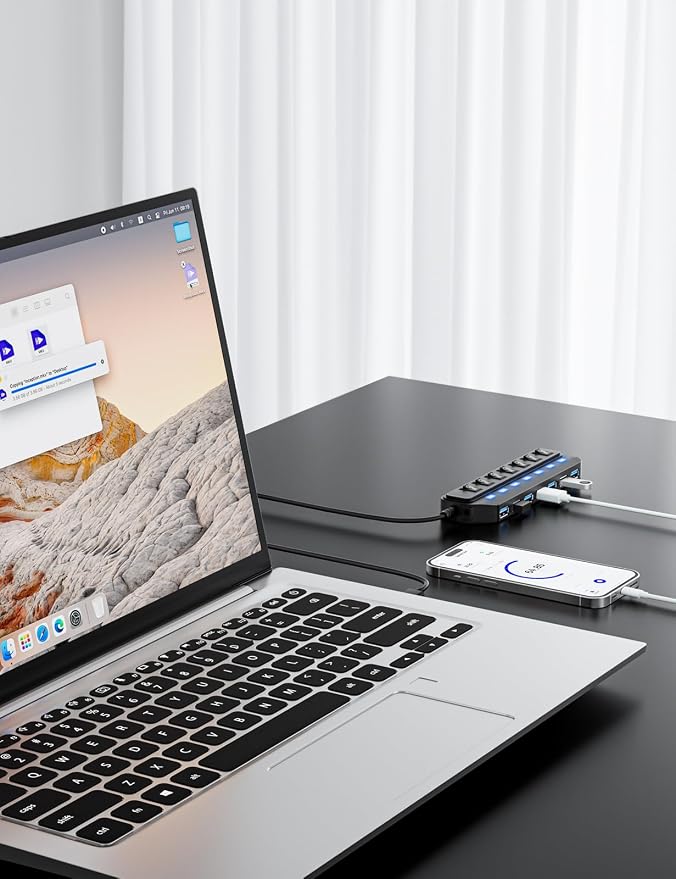
- [USB PORT HUB EXPANDER] 7 port usb hub which makes it very easy to connect Multi USB devices to your PC, laptop simultaneously, such as keyboard, mouse, card reader, mobile HDD, webcam etc 𝙉𝙊𝙏𝙀:𝘾𝙝𝙖𝙧𝙜𝙞𝙣𝙜 𝙉𝙤𝙩 𝙎𝙪𝙥𝙥𝙤𝙧𝙩𝙚𝙙
- [5GBPS DATA TRANSFER SPEED] The USB 3.0 Hub extension provides up to 5 Gbps data transfer speed, which is more than 10 times faster than USB 2.0, and it is backwards compatible with USB 2.0/1.0
- [INDIVIDUAL ON/OFF SWITCHES] WIRWTRU USB hub has built-in on and off switches with led indicators for each port, being able to turn on or off the separate USB port without unplugging the equipment, blue LED lights let you know the working status easily.
- [WIDE COMPATIBILITY] USB Hub is compatible with the most operating systems: Windows XP/Vista/7/8/10/11; MacOS-8/9/X, UNIX, Linux and offers fast PLUG-AND-PLAY installation.
- [COMPACT & PORTABLE] The USB extension cable multiple port has been intelligently designed to be as slim and light as possible, ideal for your working and traveling with ultrabook. Exquisite gift box packaging, easy to store and use.
Overview
- Brand : WIRWTRU
- Hardware Interface : USB 3.0
- Special Feature : Fast Data Transfer
- Compatible Devices : Desktops
- Total USB Ports : 7




Work Smarter From Home




WHY WORK BETTER WITH US?

10K+
HAPPY WORKSPACES
10+
HOME OFFICE EXPERIENCE
50+
WORKSPACE COLLECTIONS
1000+
PRODUCTIVITY UPGRADES


WHY UPGRADE YOUR HOME OFFICE?


Home Office Questions
Home Office Tips
-

How to Choose the Best Desk Lamp for Your Home ...
The right desk lamp can improve visibility, reduce distracting screen glare, and create a more comfortable home office. This 2026 guide explains how to choose an LED desk lamp based...
How to Choose the Best Desk Lamp for Your Home ...
The right desk lamp can improve visibility, reduce distracting screen glare, and create a more comfortable home office. This 2026 guide explains how to choose an LED desk lamp based...
-

How to Choose the Best Filing Cabinet for a Mor...
Choosing the right filing cabinet can keep important documents organized, secure, and easy to access while reducing home office clutter. This 2026 buyer’s guide explains how to compare filing cabinet...
How to Choose the Best Filing Cabinet for a Mor...
Choosing the right filing cabinet can keep important documents organized, secure, and easy to access while reducing home office clutter. This 2026 buyer’s guide explains how to compare filing cabinet...
-

How to Choose the Best Foot Rest for Your Home ...
A high-quality foot rest can improve posture, reduce pressure on your legs and lower back, and increase comfort during long workdays. This 2026 buyer's guide explains how to compare ergonomic...
How to Choose the Best Foot Rest for Your Home ...
A high-quality foot rest can improve posture, reduce pressure on your legs and lower back, and increase comfort during long workdays. This 2026 buyer's guide explains how to compare ergonomic...


