


Redragon Wireless Gaming Keyboard, RGB Backlit, Portable 60% Design, Black
Redragon Wireless Gaming Keyboard, RGB Backlit, Portable 60% Design, Black
Couldn't load pickup availability
- 24/7 Customer Support
- Risk-Free 30-Day Returns
- Fast & Reliable U.S. Shipping
Contact Information
Contact Information
30-Day Hassle-Free Returns
30-Day Hassle-Free Returns
Not satisfied? Return your order within 30 days for a full refund or exchange — simple and easy.
✔ Easy return process
✔ Fast refunds
✔ No hidden conditions
Fast U.S. Shipping
Fast U.S. Shipping
We ship within the United States only — no international delays.
✔ Processing time: 1–2 business days
✔ Delivery time: 3–7 business days
✔ Real-time tracking available
👉 Track your order anytime from the header via Track Order
About This
- 【Tri-Mode Connection & Wide Compatibility】Support Bluetooth 5.0, 2.4G wireless and USB-C wired three connection modes, which can easily connect to PC, Mac, tablet, smartphone, PS and Xbox. You can switch between multiple devices instantly via hotkeys and side buttons, perfectly meeting the dual needs of office work and gaming. Its 60% compact tenkeyless design removes the numpad, helping save desk space and enabling more flexible mouse movement for a more comfortable using experience.
- 【Long-Lasting Rechargeable Battery & Power Saving】Built-in 4000mAh high-capacity rechargeable battery, providing long-lasting power support. You can enjoy up to 50 hours of continuous use with RGB lighting on, and up to 300 hours when the lights are off. An auto-sleep function will activate after 2 minutes of inactivity to reduce power consumption, and you can wake it up instantly by pressing any key. Note: Items are partially charged for safe transportation.
- 【16.8M RGB Lighting & Custom Backlit】It boasts 16.8 million RGB colors, 8 dynamic lighting effects, 6 custom DIY modes and 7 solid color backlight options. You can freely adjust the brightness and lighting speed in 5 levels, delivering soft lighting for comfortable daily office use at night and vivid lighting for an immersive gaming experience.
- 【26 Keys Anti-Ghosting Keyboard】The 26-keys anti-ghosting function ensures every button can be accurately triggered, allowing you to trigger key combinations precisely in games. With this feature, each skill can be released accurately, effectively increasing your winning rate. The Redragon K519RGB-PRO will be your perfect partner in both gaming and office scenarios.
- 【12 Multimedia Combination Keys & Dedicated Backlit Controls】The Redragon K519RGB-PRO wireless keyboard is equipped with 12 multimedia keys, which can greatly enhance your gaming and office efficiency and make your operation more convenient. It also has quick access buttons for brightness, lighting mode and game mode, allowing you to quickly adjust brightness, lighting profiles and enable game mode with just one touch.
- 【Mechanical Feeling & Fast Tapping】The PC keyboard keys are designed with a mechanical feeling, bringing you a better tactile experience during use. At the same time, it enables fast key triggering, helping you respond quickly in games and win every match with ease.
- 【Where can I download the driver software?】Visit the official Redragon website (redragonzone.com/software.html ), click "KEYBOARDS" , search for model "K519RGB", and download the driver software.
Overview
- Brand : Redragon
- Compatible Devices : Gaming Console, Laptop, PC, Smartphone, Tablet
- Connectivity Technology : 2.4Ghz, Bluetooth, USB-C
- Keyboard Description : Gaming
- Recommended Uses For Product : Business, Education, Everyday Use, Gaming, Multimedia, Office, Personal
- Special Feature : Backlit, Ergonomic, Hotkeys and Media Keys, Integrated Stand, Spill Proof
- Color : Black
- Keyboard backlighting color support : RGB
- Style : Classic
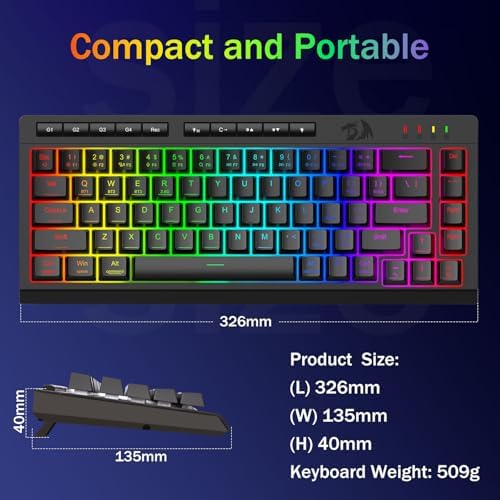
- Product Dimensions : 12"L x 1.3"W x 6.1"H




Work Smarter From Home




WHY WORK BETTER WITH US?

10K+
HAPPY WORKSPACES
10+
HOME OFFICE EXPERIENCE
50+
WORKSPACE COLLECTIONS
1000+
PRODUCTIVITY UPGRADES


WHY UPGRADE YOUR HOME OFFICE?


Home Office Questions
Home Office Tips
-

How to Choose the Best Monitor Light Bar for Yo...
Upgrade your home office lighting with the right monitor light bar. This 2026 buying guide explains how to choose the best LED monitor light bar based on brightness, adjustable color...
How to Choose the Best Monitor Light Bar for Yo...
Upgrade your home office lighting with the right monitor light bar. This 2026 buying guide explains how to choose the best LED monitor light bar based on brightness, adjustable color...
-

How to Choose the Best Under-Desk Drawer Organi...
Maximize your workspace with the right under desk drawer organizer. This 2026 buying guide explains how to choose the best under desk storage solution based on drawer size, storage capacity,...
How to Choose the Best Under-Desk Drawer Organi...
Maximize your workspace with the right under desk drawer organizer. This 2026 buying guide explains how to choose the best under desk storage solution based on drawer size, storage capacity,...
-

How to Choose the Best Desk Mat for Your Home O...
The right desk mat can protect your desktop while creating a cleaner, more comfortable workspace for your keyboard, mouse, laptop, and everyday accessories. This 2026 guide explains how to choose...
How to Choose the Best Desk Mat for Your Home O...
The right desk mat can protect your desktop while creating a cleaner, more comfortable workspace for your keyboard, mouse, laptop, and everyday accessories. This 2026 guide explains how to choose...


