


UGREEN 2-in 7-Out USB 3.2 Switch, 10 Gbps Switcher for A or C Computers Sharing All Devices(4 A+3 C) Keyboard Mouse Switch with Type C Converter Adapter,Power Adapter
UGREEN 2-in 7-Out USB 3.2 Switch, 10 Gbps Switcher for A or C Computers Sharing All Devices(4 A+3 C) Keyboard Mouse Switch with Type C Converter Adapter,Power Adapter
Couldn't load pickup availability
- 24/7 Customer Support
- Risk-Free 30-Day Returns
- Fast & Reliable U.S. Shipping
Contact Information
Contact Information
30-Day Hassle-Free Returns
30-Day Hassle-Free Returns
Not satisfied? Return your order within 30 days for a full refund or exchange — simple and easy.
✔ Easy return process
✔ Fast refunds
✔ No hidden conditions
Fast U.S. Shipping
Fast U.S. Shipping
We ship within the United States only — no international delays.
✔ Processing time: 1–2 business days
✔ Delivery time: 3–7 business days
✔ Real-time tracking available
👉 Track your order anytime from the header via Track Order
About This
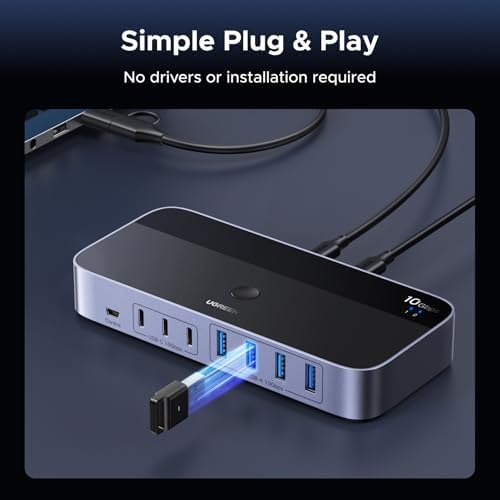
- 2-In 7-Out USB A switch: UGREEN USB Switcher allows 2 computers to share up to 7 USB devices (4×USB-A + 3×USB-C) — Regardless of port type, easily connect your existing peripherals like keyboards, mice, printers, flash drives, and more. No need to buy extra USB hubs or docks — save money and keep your workspace neat. (Not a KVM switch, no video output supported.)
- 10Gbps Transfer Speed: The USB-C switch is equipped with 4 USB 3.2 Gen 2 ports and speeds up to 10Gbps. Faster than traditional 5gbps USB Switches, Transfer 1 GB files in 1.5 second to improve work efficiency without waiting.(The USB ports are primarily for data transmission — audio device connections are not recommended)
- Includes USB-C to USB-A Cable: Designed to work with both USB-C and USB-A computers — perfect for mixed setups. No extra adapters required — easily connect MacBooks, ultrabooks, desktops, and older laptops to the same switch.
- Comes with Power Adapter: This switch includes a power adapter and charging cable. Ensures stable performance for high-power devices like external hard drives and printers — no more disconnects or laggy transfers.
- Boost Productivity & Keep Desktop Clean: Quickly switch between work and personal computers with button or external controller. Improve workflow and keep your desktop tidy.
Overview
- Brand : UGREEN
- Color : Black
- Hardware Interface : USB
- Special Feature : Powered, Fast Charging, Indicator Light
- Compatible Devices : Laptops




Work Smarter From Home




WHY WORK BETTER WITH US?

10K+
HAPPY WORKSPACES
10+
HOME OFFICE EXPERIENCE
50+
WORKSPACE COLLECTIONS
1000+
PRODUCTIVITY UPGRADES


WHY UPGRADE YOUR HOME OFFICE?


Home Office Questions
Home Office Tips
-

How to Choose the Best Monitor Light Bar for Yo...
Upgrade your home office lighting with the right monitor light bar. This 2026 buying guide explains how to choose the best LED monitor light bar based on brightness, adjustable color...
How to Choose the Best Monitor Light Bar for Yo...
Upgrade your home office lighting with the right monitor light bar. This 2026 buying guide explains how to choose the best LED monitor light bar based on brightness, adjustable color...
-

How to Choose the Best Under-Desk Drawer Organi...
Maximize your workspace with the right under desk drawer organizer. This 2026 buying guide explains how to choose the best under desk storage solution based on drawer size, storage capacity,...
How to Choose the Best Under-Desk Drawer Organi...
Maximize your workspace with the right under desk drawer organizer. This 2026 buying guide explains how to choose the best under desk storage solution based on drawer size, storage capacity,...
-

How to Choose the Best Desk Mat for Your Home O...
The right desk mat can protect your desktop while creating a cleaner, more comfortable workspace for your keyboard, mouse, laptop, and everyday accessories. This 2026 guide explains how to choose...
How to Choose the Best Desk Mat for Your Home O...
The right desk mat can protect your desktop while creating a cleaner, more comfortable workspace for your keyboard, mouse, laptop, and everyday accessories. This 2026 guide explains how to choose...


