


15A Dual Smart Plug 4 Pack, GHome Smart Plugs that Work with Alexa and Google Home, 2-in-1 Compact Smart Outlet Timer with APP Remote Control, 2.4GHz Wi-Fi Only, No Hub Required, FCC Listed
15A Dual Smart Plug 4 Pack, GHome Smart Plugs that Work with Alexa and Google Home, 2-in-1 Compact Smart Outlet Timer with APP Remote Control, 2.4GHz Wi-Fi Only, No Hub Required, FCC Listed
Couldn't load pickup availability
- 24/7 Customer Support
- Risk-Free 30-Day Returns
- Fast & Reliable U.S. Shipping
Contact Information
Contact Information
30-Day Hassle-Free Returns
30-Day Hassle-Free Returns
Not satisfied? Return your order within 30 days for a full refund or exchange — simple and easy.
✔ Easy return process
✔ Fast refunds
✔ No hidden conditions
Fast U.S. Shipping
Fast U.S. Shipping
We ship within the United States only — no international delays.
✔ Processing time: 1–2 business days
✔ Delivery time: 3–7 business days
✔ Real-time tracking available
👉 Track your order anytime from the header via Track Order
About This
- 【Quick & Stable Connection】Rated for 15A/1800W to power heavy-duty devices. Features fast setup via BT and Wi-Fi. Simply connect to a 2.4GHz Wi-Fi network for reliable performance. Note: Don't support 5G WiFi.
- 【2-in-1 Space-Saving Design】One compact smart plug with two fully independent controlled outlets. Enjoy independent control and set up to power different devices without clutter, all within one space-saving design.
- 【Hand-Free Voice Control】Smart plugs that work with Alexa & Google Home Assistant. Just use simple voice commands to control your devices. Tips: please connect wifi smart plug to the GHome app first—cannot link directly to Alexa/Google Home.
- 【Timer & Schedules】Easily set timers to automate your devices on a custom schedule. It's perfect for managing lights, fans, and other smart appliances, helping you save energy through automatic on/off cycles or random control.
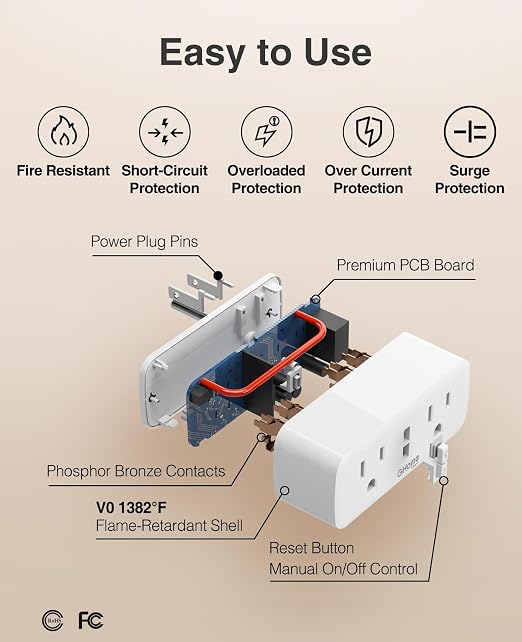
- 【Controllable & Reliable】Enjoy full control via the GHome, Smart Life, or Tuya app—including app remote access, grouping, and sharing—all backed by a V0 fire-resistant casing, overload & surge protection, and a 2-year warranty.
Overview
- Operation Mode : ON-OFF-ON
- Current Rating : 15 Amps
- Operating Voltage : 120 Volts (AC)
- Contact Type : Normally Open
- Connector Type : Plug In
- Brand : GHome Smart
- Switch Type : Push Button
- Terminal : Screw
- Material : Plastic
- Circuit Type : parallel




Work Smarter From Home




WHY WORK BETTER WITH US?

10K+
HAPPY WORKSPACES
10+
HOME OFFICE EXPERIENCE
50+
WORKSPACE COLLECTIONS
1000+
PRODUCTIVITY UPGRADES


WHY UPGRADE YOUR HOME OFFICE?


Home Office Questions
Home Office Tips
-

How to Choose the Best Desk Lamp for Your Home ...
The right desk lamp can improve visibility, reduce distracting screen glare, and create a more comfortable home office. This 2026 guide explains how to choose an LED desk lamp based...
How to Choose the Best Desk Lamp for Your Home ...
The right desk lamp can improve visibility, reduce distracting screen glare, and create a more comfortable home office. This 2026 guide explains how to choose an LED desk lamp based...
-

How to Choose the Best Filing Cabinet for a Mor...
Choosing the right filing cabinet can keep important documents organized, secure, and easy to access while reducing home office clutter. This 2026 buyer’s guide explains how to compare filing cabinet...
How to Choose the Best Filing Cabinet for a Mor...
Choosing the right filing cabinet can keep important documents organized, secure, and easy to access while reducing home office clutter. This 2026 buyer’s guide explains how to compare filing cabinet...
-

How to Choose the Best Foot Rest for Your Home ...
A high-quality foot rest can improve posture, reduce pressure on your legs and lower back, and increase comfort during long workdays. This 2026 buyer's guide explains how to compare ergonomic...
How to Choose the Best Foot Rest for Your Home ...
A high-quality foot rest can improve posture, reduce pressure on your legs and lower back, and increase comfort during long workdays. This 2026 buyer's guide explains how to compare ergonomic...


