


ZIUMIER Powered USB Hub, 10 Ports USB 3.0 Hub with RGB LED Strip | 12V/2A Power Adapter USB Extension,Individual LED On/Off Switches for Mac, PC, Desktop, Flash Drive, Mobile HDD
ZIUMIER Powered USB Hub, 10 Ports USB 3.0 Hub with RGB LED Strip | 12V/2A Power Adapter USB Extension,Individual LED On/Off Switches for Mac, PC, Desktop, Flash Drive, Mobile HDD
Couldn't load pickup availability
- 24/7 Customer Support
- Risk-Free 30-Day Returns
- Fast & Reliable U.S. Shipping
Contact Information
Contact Information
30-Day Hassle-Free Returns
30-Day Hassle-Free Returns
Not satisfied? Return your order within 30 days for a full refund or exchange — simple and easy.
✔ Easy return process
✔ Fast refunds
✔ No hidden conditions
Fast U.S. Shipping
Fast U.S. Shipping
We ship within the United States only — no international delays.
✔ Processing time: 1–2 business days
✔ Delivery time: 3–7 business days
✔ Real-time tracking available
👉 Track your order anytime from the header via Track Order
About This
- RGB LED Strip: RGB USB hub features lighting color,bring a new experience to your game/work. Gaming USB hub has a RGB button, You can switch on/off the light at will and turn on/off the independent USB port for flexible use.
- USB 3.0 Port Expansion & 5Gbps Transfer Speed:USB hub can expand 1 USB port to 10 external USB A ports for keyboard, mouse, card reader, hard drivers, USB Flash drive, printer and more. Data transfer speed up to 5Gbps.Say goodbye to not having enough computer jacks and slow data transfers.
- Individual Switch with LED:This USB splitter is designed with individual on/off switches, you can turn the switch on and off whenever you choose without unplugging the equipment. Besides, Each port includes LED light so you can check the status.
- 12/2A Power Supply:The powered USB hub is equipped with 24W power supply,plug and play with all USB 3.0, USB 2.0, USB 1.1 and USB 1.0 devices.It can power multiple USB devices simultaneously, ensuring secure and stable data transfer for all connected devices.𝙁𝙖𝙨𝙩 𝘾𝙝𝙖𝙧𝙜𝙞𝙣𝙜 𝙣𝙤𝙩 𝙎𝙪𝙥𝙥𝙤𝙧𝙩𝙚𝙙
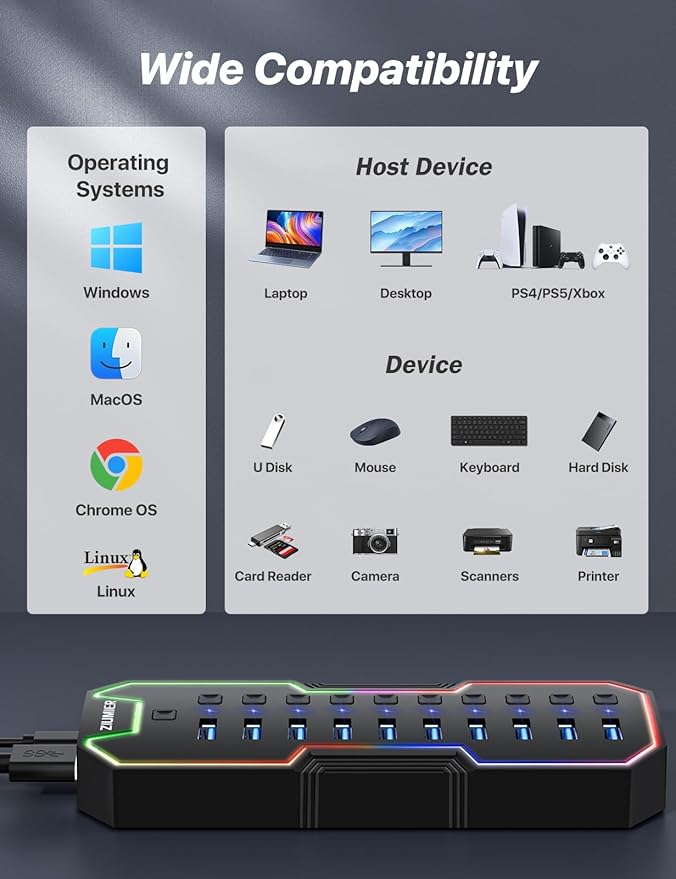
- Broad Compatibility for a Seamless Experience: Our USB 3.0 usb hub is compatible with Windows XP/Vista/Win 7/Win 8/Win 10, Mac OS, Linux 9, and above, supporting all USB 3.0, USB 2.0, USB 1.1, and USB 1.0 peripherals. Simply plug and play without the need for any drivers.
Overview
- Brand : ZIUMIER
- Hardware Interface : USB
- Special Feature : LED Indication, Individual Switch with LED
- Total USB Ports : 10
- Data Transfer Rate : 5 Gigabits Per Second




Work Smarter From Home




WHY WORK BETTER WITH US?

10K+
HAPPY WORKSPACES
10+
HOME OFFICE EXPERIENCE
50+
WORKSPACE COLLECTIONS
1000+
PRODUCTIVITY UPGRADES


WHY UPGRADE YOUR HOME OFFICE?


Home Office Questions
Home Office Tips
-

How to Choose the Best Under-Desk Drawer Organi...
Maximize your workspace with the right under desk drawer organizer. This 2026 buying guide explains how to choose the best under desk storage solution based on drawer size, storage capacity,...
How to Choose the Best Under-Desk Drawer Organi...
Maximize your workspace with the right under desk drawer organizer. This 2026 buying guide explains how to choose the best under desk storage solution based on drawer size, storage capacity,...
-

How to Choose the Best Desk Mat for Your Home O...
The right desk mat can protect your desktop while creating a cleaner, more comfortable workspace for your keyboard, mouse, laptop, and everyday accessories. This 2026 guide explains how to choose...
How to Choose the Best Desk Mat for Your Home O...
The right desk mat can protect your desktop while creating a cleaner, more comfortable workspace for your keyboard, mouse, laptop, and everyday accessories. This 2026 guide explains how to choose...
-

How to Choose the Best Under-Desk Footrest for ...
A well-designed under-desk footrest can provide stable foot support and help create a more comfortable seated workstation. This 2026 guide explains how to compare height, adjustability, surface design, materials, stability,...
How to Choose the Best Under-Desk Footrest for ...
A well-designed under-desk footrest can provide stable foot support and help create a more comfortable seated workstation. This 2026 guide explains how to compare height, adjustability, surface design, materials, stability,...


