


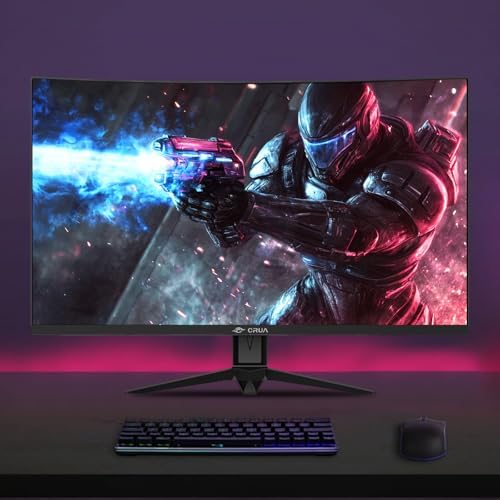
CRUA 32" FHD 1080P 240Hz Curved Gaming Monitor, 1800R, AMD FreeSync, Black
CRUA 32" FHD 1080P 240Hz Curved Gaming Monitor, 1800R, AMD FreeSync, Black
Couldn't load pickup availability
- 24/7 Customer Support
- Risk-Free 30-Day Returns
- Fast & Reliable U.S. Shipping
Contact Information
Contact Information
30-Day Hassle-Free Returns
30-Day Hassle-Free Returns
Not satisfied? Return your order within 30 days for a full refund or exchange — simple and easy.
✔ Easy return process
✔ Fast refunds
✔ No hidden conditions
Fast U.S. Shipping
Fast U.S. Shipping
We ship within the United States only — no international delays.
✔ Processing time: 1–2 business days
✔ Delivery time: 3–7 business days
✔ Real-time tracking available
👉 Track your order anytime from the header via Track Order
About This
- 240Hz Gaming Monitor: Experience ultra-smooth gameplay with a 240Hz refresh rate and AMD FreeSync, reducing screen tearing, stutter, and motion blur for clearer, more responsive visuals. Ideal for fast-paced gaming, esports, racing games, and everyday PC entertainment
- 32" Curved Monitor: The 32-inch 1800R curved screen creates a more immersive viewing experience, while the VA panel, 3500:1 contrast ratio, and 178° wide viewing angles deliver deep blacks and vivid detail. Great for gaming, streaming, movies, and multitasking
- 120% sRGB & Eye Care: With 120% sRGB color gamut, 16.7 million colors, and 288 nits brightness, this monitor delivers rich, lifelike visuals for gaming, content creation, media viewing, and light photo or video editing. Low Blue Light helps reduce eye strain during longer sessions
- Flexible Setup: Equipped with HDMI 2.0 and DP 1.4, this monitor connects easily to PCs, laptops, and external devices. The 100×100mm wall mount support allows flexible placement, making it ideal for gaming rooms, home offices, streaming setups, and dual-monitor workstations
- High Value Choice: Designed to deliver strong gaming and entertainment performance at an accessible price, this monitor combines a high refresh rate, curved display, vivid color, and versatile connectivity in one practical setup for gaming, work, and daily use
- Assurances: We provide high-quality computer monitors and premium services. If you have any questions, you are welcome to contact us at any time, we are here to serve you and solve all your problems
Overview
- Brand : CRUA
- Screen Size : 32 inches
- Resolution : FHD 1080p
- Aspect Ratio : 16:9
- Screen Surface Description : Matte




Work Smarter From Home




WHY WORK BETTER WITH US?

10K+
HAPPY WORKSPACES
10+
HOME OFFICE EXPERIENCE
50+
WORKSPACE COLLECTIONS
1000+
PRODUCTIVITY UPGRADES


WHY UPGRADE YOUR HOME OFFICE?


Home Office Questions
Home Office Tips
-

How to Choose the Best Monitor Light Bar for Yo...
Upgrade your home office lighting with the right monitor light bar. This 2026 buying guide explains how to choose the best LED monitor light bar based on brightness, adjustable color...
How to Choose the Best Monitor Light Bar for Yo...
Upgrade your home office lighting with the right monitor light bar. This 2026 buying guide explains how to choose the best LED monitor light bar based on brightness, adjustable color...
-

How to Choose the Best Under-Desk Drawer Organi...
Maximize your workspace with the right under desk drawer organizer. This 2026 buying guide explains how to choose the best under desk storage solution based on drawer size, storage capacity,...
How to Choose the Best Under-Desk Drawer Organi...
Maximize your workspace with the right under desk drawer organizer. This 2026 buying guide explains how to choose the best under desk storage solution based on drawer size, storage capacity,...
-

How to Choose the Best Desk Mat for Your Home O...
The right desk mat can protect your desktop while creating a cleaner, more comfortable workspace for your keyboard, mouse, laptop, and everyday accessories. This 2026 guide explains how to choose...
How to Choose the Best Desk Mat for Your Home O...
The right desk mat can protect your desktop while creating a cleaner, more comfortable workspace for your keyboard, mouse, laptop, and everyday accessories. This 2026 guide explains how to choose...


