


intpw USB C Hub, P9 USB C Hub Multiport Adapter with 4K@60Hz HDMI, PD 100W, Type-C & 2 USB A 3.0 5Gbps, 2 USB A 2.0, SD/TF Ports, Aluminum USB Hub for Laptop, iPhone 17 Series, MacBook, iPad
intpw USB C Hub, P9 USB C Hub Multiport Adapter with 4K@60Hz HDMI, PD 100W, Type-C & 2 USB A 3.0 5Gbps, 2 USB A 2.0, SD/TF Ports, Aluminum USB Hub for Laptop, iPhone 17 Series, MacBook, iPad
Couldn't load pickup availability
- 24/7 Customer Support
- Risk-Free 30-Day Returns
- Fast & Reliable U.S. Shipping
Contact Information
Contact Information
30-Day Hassle-Free Returns
30-Day Hassle-Free Returns
Not satisfied? Return your order within 30 days for a full refund or exchange — simple and easy.
✔ Easy return process
✔ Fast refunds
✔ No hidden conditions
Fast U.S. Shipping
Fast U.S. Shipping
We ship within the United States only — no international delays.
✔ Processing time: 1–2 business days
✔ Delivery time: 3–7 business days
✔ Real-time tracking available
👉 Track your order anytime from the header via Track Order
About This
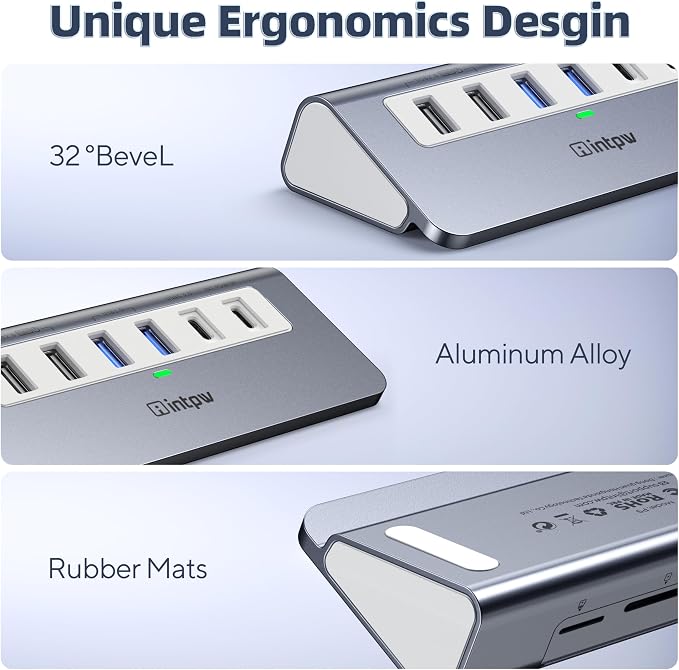
- 9-IN-1 USB C Hub: Aluminum ergonomic design with a 32° angled port layout for effortless plug-and-unplug. intpw usb hub includes 4K@60Hz HDMI, PD 100W Charging, 3 USB 3.0 5Gbps, 2 USB 2.0, SD/TF 3.0 Slots—perfect for work, study, or travel. All ports can work simultaneously. USB-C Cable Length is about 4ft(120cm). Long enough to connect your laptop.
- Brillant 4K@60Hz Display: intpw usb hub for pc can stream 4K@60Hz video to HDTV, Monitors or projectors via HDMI port, presenting you a visually stunning movies, high-definition online meetings. Perfect for education, recreation, work, fitness, gaming and more. Note: Please plug in your laptop's power adapter before connecting monitor. USB-C devices should support USB Type-C DP Alt Mode or thunderbolt, otherwise will won’t output images on monitors or screens.
- High-Speed Data Transfer: 3 USB 3.0 Ports transfer speed up to 5Gbps. USB C to hdmi takes only a few seconds to transfer photos or videos to your laptop. 2 USB 2.0 can connect to your keyboard and mouse. USB 3.0/2.0 data port not recommend for charging/video/audio.
- PD 100W Fast Charging: Using 100W USB-C PD charging port to charge your MacBook Pro/Air or other USB C laptop. Note: For a better experience, when you use the powered usb hub, please use your orginal power supply or at least 65W power supply to charge your laptop via usb port hub. Note: power adapter is not included and PD port not support data transfer and video output.
- Wide Compatibility: intpw usb hub for pc is compatible with almost type-c devices such as MacBook Pro/Air, MacBook, iMac, iPad Pro, iPhone 17/16/15 Series etc. Note: Doesn't unplug or plug the PD charger when using the usb hub usb c. This prevents the device from being disconnected, the HDMI connection screen is not displayed, and data transferred from external USB devices is lost.
Overview
- Brand : intpw
- Color : Grey
- Hardware Interface : HDMI, MicroSD, Thunderbolt, USB 2.0, USB 3.0
- Special Feature : Anti-Slip, Fast Data Transfer, Heat Resistant, Indicator Light, Lightweight
- Compatible Devices : Type C Laptops, iPad Air/Pro, MicroSD/SD Card Reader, Mouse, Keyboard, iPhone 17 Pro Max, iPhone 17 Pro, iPhone 17 Air, iPhone 17, iPhone 16 Pro Max, iPhone 16 Pro, iPhone 16, iPhone 16E, iPhone 16 Plus, iPhone 15 Pro Max, iPhone 15 Pro, iPhone 15, iPhone 15 Plus, Most type C Device, type-C Laptops Type C Laptops, iPad Air/Pro, MicroSD/SD Card Reader, Mouse, Keyboard, iPhone 17 Pro Max, iPhone 17 Pro, iPhone 17 Air, iPhone 17, iPhone 16 Pro Max, iPhone 16 Pro, iPhone 16, iPhone 16E, iPhone 16 Plus, iPhone 15 Pro… See more




Work Smarter From Home




WHY WORK BETTER WITH US?

10K+
HAPPY WORKSPACES
10+
HOME OFFICE EXPERIENCE
50+
WORKSPACE COLLECTIONS
1000+
PRODUCTIVITY UPGRADES


WHY UPGRADE YOUR HOME OFFICE?


Home Office Questions
Home Office Tips
-

How to Choose the Best Desk Lamp for Your Home ...
The right desk lamp can improve visibility, reduce distracting screen glare, and create a more comfortable home office. This 2026 guide explains how to choose an LED desk lamp based...
How to Choose the Best Desk Lamp for Your Home ...
The right desk lamp can improve visibility, reduce distracting screen glare, and create a more comfortable home office. This 2026 guide explains how to choose an LED desk lamp based...
-

How to Choose the Best Filing Cabinet for a Mor...
Choosing the right filing cabinet can keep important documents organized, secure, and easy to access while reducing home office clutter. This 2026 buyer’s guide explains how to compare filing cabinet...
How to Choose the Best Filing Cabinet for a Mor...
Choosing the right filing cabinet can keep important documents organized, secure, and easy to access while reducing home office clutter. This 2026 buyer’s guide explains how to compare filing cabinet...
-

How to Choose the Best Foot Rest for Your Home ...
A high-quality foot rest can improve posture, reduce pressure on your legs and lower back, and increase comfort during long workdays. This 2026 buyer's guide explains how to compare ergonomic...
How to Choose the Best Foot Rest for Your Home ...
A high-quality foot rest can improve posture, reduce pressure on your legs and lower back, and increase comfort during long workdays. This 2026 buyer's guide explains how to compare ergonomic...


