


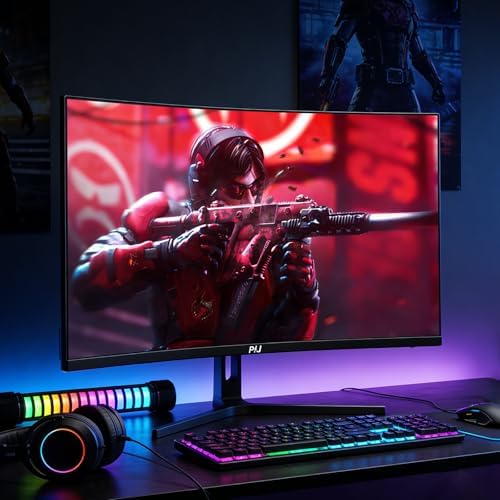
PIJ 32 Inch Curved Gaming Monitor 160Hz 4K UHD PC Screen Built-in Speakers
PIJ 32 Inch Curved Gaming Monitor 160Hz 4K UHD PC Screen Built-in Speakers
Couldn't load pickup availability
- 24/7 Customer Support
- Risk-Free 30-Day Returns
- Fast & Reliable U.S. Shipping
Contact Information
Contact Information
30-Day Hassle-Free Returns
30-Day Hassle-Free Returns
Not satisfied? Return your order within 30 days for a full refund or exchange — simple and easy.
✔ Easy return process
✔ Fast refunds
✔ No hidden conditions
Fast U.S. Shipping
Fast U.S. Shipping
We ship within the United States only — no international delays.
✔ Processing time: 1–2 business days
✔ Delivery time: 3–7 business days
✔ Real-time tracking available
👉 Track your order anytime from the header via Track Order
About This
- Stunning 4K Curved Immersion: Experience breathtaking clarity with the 32-inch 4K UHD (3840x2160) resolution and 1500R curvature pulls you into the action, providing a panoramic view that enhances depth and immersion—perfect for gamers, streamers, and multitaskers seeking a high-end curved screen for gaming
- Ultra-Smooth Gameplay with 160Hz & FreeSync: Dominate fast-paced titles with a native 144Hz refresh rate that can be overclocked to 160Hz, paired with 1ms GTG response time to eliminate motion blur. Combined with AMD FreeSync technology, screen tearing and stuttering are minimized for a seamless high refresh rate monitor experience. Ideal for fast-paced FPS, racing, or battle royale titles
- Versatile Connectivity & Built-in Speakers: Equipped with two HDMI 2.1 and two DisplayPort 1.4 inputs, this monitor easily connects to next-gen consoles (PS5/Xbox Series X) and high-performance PCs at full 4K high refresh rates. Built-in stereo speakers provide clear audio right out of the box, reducing desktop clutter—perfect for gamers and streamers who need a clean setup.
- RGB & Ergonomic Design – Enhance your gaming atmosphere with the rear RGB lighting that adds a dynamic glow to your battlestation. The stand allows 5° to 15° tilt adjustment (±4°) for comfortable viewing angles, and the 75x75mm VESA mount compatibility lets you switch to wall or arm mounting for a flexible workspace.
- PIJ Services: PIJ provides high-quality computer monitor and premium services, included 12-month warranty. If you find any damage, malfunction or missing accessories, please contact us at anytime
Overview
- Brand : PIJ
- Screen Size : 32 inches
- Resolution : UHD 21600p
- Aspect Ratio : 16:9
- Screen Surface Description : Matte




Work Smarter From Home




WHY WORK BETTER WITH US?

10K+
HAPPY WORKSPACES
10+
HOME OFFICE EXPERIENCE
50+
WORKSPACE COLLECTIONS
1000+
PRODUCTIVITY UPGRADES


WHY UPGRADE YOUR HOME OFFICE?


Home Office Questions
Home Office Tips
-

How to Choose the Best Monitor Light Bar for Yo...
Upgrade your home office lighting with the right monitor light bar. This 2026 buying guide explains how to choose the best LED monitor light bar based on brightness, adjustable color...
How to Choose the Best Monitor Light Bar for Yo...
Upgrade your home office lighting with the right monitor light bar. This 2026 buying guide explains how to choose the best LED monitor light bar based on brightness, adjustable color...
-

How to Choose the Best Under-Desk Drawer Organi...
Maximize your workspace with the right under desk drawer organizer. This 2026 buying guide explains how to choose the best under desk storage solution based on drawer size, storage capacity,...
How to Choose the Best Under-Desk Drawer Organi...
Maximize your workspace with the right under desk drawer organizer. This 2026 buying guide explains how to choose the best under desk storage solution based on drawer size, storage capacity,...
-

How to Choose the Best Desk Mat for Your Home O...
The right desk mat can protect your desktop while creating a cleaner, more comfortable workspace for your keyboard, mouse, laptop, and everyday accessories. This 2026 guide explains how to choose...
How to Choose the Best Desk Mat for Your Home O...
The right desk mat can protect your desktop while creating a cleaner, more comfortable workspace for your keyboard, mouse, laptop, and everyday accessories. This 2026 guide explains how to choose...


