


monTEK Powered Stacked Dual Monitor Stand for 17-32", Clamp/Grommet
monTEK Powered Stacked Dual Monitor Stand for 17-32", Clamp/Grommet
Couldn't load pickup availability
- 24/7 Customer Support
- Risk-Free 30-Day Returns
- Fast & Reliable U.S. Shipping
Contact Information
Contact Information
30-Day Hassle-Free Returns
30-Day Hassle-Free Returns
Not satisfied? Return your order within 30 days for a full refund or exchange — simple and easy.
✔ Easy return process
✔ Fast refunds
✔ No hidden conditions
Fast U.S. Shipping
Fast U.S. Shipping
We ship within the United States only — no international delays.
✔ Processing time: 1–2 business days
✔ Delivery time: 3–7 business days
✔ Real-time tracking available
👉 Track your order anytime from the header via Track Order
About This
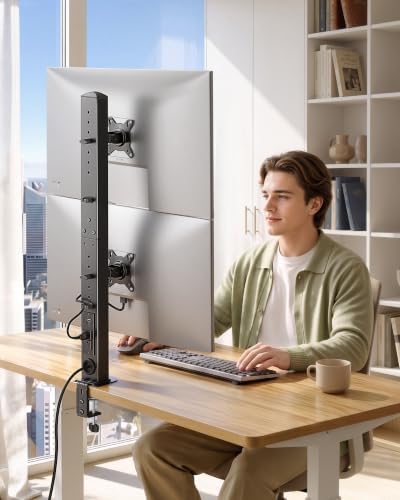
- FITS TWO 17-34 INCH MONITORS: Each mounting bracket supports one monitor weighing up to 26.4 lb and fits 75x75 mm or 100x100 mm VESA patterns. Verify the size, weight, and VESA pattern of both monitors before installation.
- SPACE-SAVING VERTICAL LAYOUT: Stack two monitors one above the other to create a dual-screen workstation without using additional horizontal desk space. The vertical arrangement keeps more room available for other desktop equipment.
- INDEPENDENT HEIGHT AND ANGLE CONTROL: The upper monitor offers seven fixed height positions, while the lower monitor offers five. Each screen can also tilt ±45°, swivel ±30°, and rotate ±180° for landscape or portrait viewing.
- BUILT-IN POWER ACCESS: The center column includes 2 AC outlets, 1 USB port, and 1 USB-C port. AC output is rated at 125V/15A, USB output at 5V/2.1A, and the power cable measures 4.9 ft.
- TWO DESK-MOUNTING OPTIONS: Use the C-clamp on desktops 0.39-3.1 inches thick or install the grommet mount on surfaces 0.39-1.8 inches thick. Adjustment knobs and integrated cable management help keep both screens aligned and cords organized.
Overview
- Mounting Type : Tabletop Mount
- Movement Type : Tilt
- Brand : monTEK
- Material : Alloy Steel
- Compatible Devices : Monitor
- Maximum Tilt Angle : 45 degrees
- Item Highlight : Vertical dual monitor desk mount, integrated power outlet, adjustable arms and clamp/grommet mounting options Vertical dual monitor desk mount, integrated power outlet, adjustable arms and clamp/grommet mounting options
- Unit Count : 1 Count
- Manufacturer : monTEK
- Number of Items : 1




Work Smarter From Home




WHY WORK BETTER WITH US?

10K+
HAPPY WORKSPACES
10+
HOME OFFICE EXPERIENCE
50+
WORKSPACE COLLECTIONS
1000+
PRODUCTIVITY UPGRADES


WHY UPGRADE YOUR HOME OFFICE?


Home Office Questions
Home Office Tips
-

How to Choose the Best Monitor Light Bar for Yo...
Upgrade your home office lighting with the right monitor light bar. This 2026 buying guide explains how to choose the best LED monitor light bar based on brightness, adjustable color...
How to Choose the Best Monitor Light Bar for Yo...
Upgrade your home office lighting with the right monitor light bar. This 2026 buying guide explains how to choose the best LED monitor light bar based on brightness, adjustable color...
-

How to Choose the Best Under-Desk Drawer Organi...
Maximize your workspace with the right under desk drawer organizer. This 2026 buying guide explains how to choose the best under desk storage solution based on drawer size, storage capacity,...
How to Choose the Best Under-Desk Drawer Organi...
Maximize your workspace with the right under desk drawer organizer. This 2026 buying guide explains how to choose the best under desk storage solution based on drawer size, storage capacity,...
-

How to Choose the Best Desk Mat for Your Home O...
The right desk mat can protect your desktop while creating a cleaner, more comfortable workspace for your keyboard, mouse, laptop, and everyday accessories. This 2026 guide explains how to choose...
How to Choose the Best Desk Mat for Your Home O...
The right desk mat can protect your desktop while creating a cleaner, more comfortable workspace for your keyboard, mouse, laptop, and everyday accessories. This 2026 guide explains how to choose...


