


iContact Camera Pro 4K HD Webcam Charging | Eye Contact, Noise Cancelling Mic, Plug and Play USB, Zoom Certified, Works with Teams, Meet, Streaming
iContact Camera Pro 4K HD Webcam Charging | Eye Contact, Noise Cancelling Mic, Plug and Play USB, Zoom Certified, Works with Teams, Meet, Streaming
Couldn't load pickup availability
- 24/7 Customer Support
- Risk-Free 30-Day Returns
- Fast & Reliable U.S. Shipping
Contact Information
Contact Information
30-Day Hassle-Free Returns
30-Day Hassle-Free Returns
Not satisfied? Return your order within 30 days for a full refund or exchange — simple and easy.
✔ Easy return process
✔ Fast refunds
✔ No hidden conditions
Fast U.S. Shipping
Fast U.S. Shipping
We ship within the United States only — no international delays.
✔ Processing time: 1–2 business days
✔ Delivery time: 3–7 business days
✔ Real-time tracking available
👉 Track your order anytime from the header via Track Order
About This
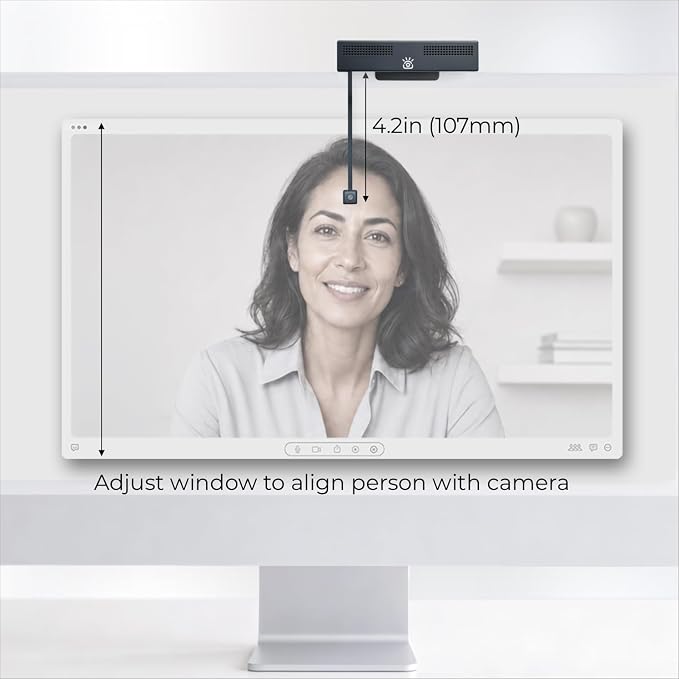
- Eye Contact webcam for Better Communication: Boost engagement, memory retention, and trust with eye contact. Flip down the retractable arm to bring the camera to eye level and make video calls feel like an in-person meeting. Flip it up out of the way when you're done.
- Compact 4K Ultra HD Sensor: WIth resolution far beyond traditional HD webcams, the iContact Camera is powered by an 12-megapixel high-resolution sensor to capture stunning 4K video at 30fps with a 78° field of view (FOV). Capturing an image that has 4x more pixels than traditional 1080P HD webcams—the next generation digital signal processor automatically adjusts lighting, white balance, color temperature, and focus to adapt to you and your environment for stunning video quality.
- Dual Noise-Cancelling Microphones: The two built-in microphones deliver immersive audio with noise reduction, ensuring clear, natural sound that makes video calls feel like you're in the same room. Perfect for meetings on desktop and larger laptops.
- Certified for Professional Use: Zoom Certified and works with major video conferencing platforms. This webcam 4K works with Zoom, Microsoft Teams, Webex, FaceTime, OBS, Twitch, Facebook, YouTube, and more.
- Plug & Play USB webcam: Instantly connects to Mac, Windows, and desktop computers with USB-C plug-and-play convenience. No drivers needed, just connect computer webcam to boost engagement, memory retention, and trust. Works great for live stream, gaming, video conferences, remote meeting, professional collaboration, streaming, recording, online school, and education apps.
- Free iContact Control App: Dial in your camera settings with the free companion app for Mac and PC. Adjust skin tone, color temperature, brightness, contrast, sharpness, focus, field of view, add text, graphics, and more. Just download the app from the iContact Camera website.
- Universal Compatibility: Designed for desktops and laptops with screen sizes up to 24". Includes a high-quality cable with sufficient length for seamless routing on larger devices. Fully compatible with Windows 7–11, Mac OS X 10.7+, Chrome OS, and Linux.
- Optimized for Work, Streaming & Gaming: the iContact Camera Pro delivers natural eye for a wide range of use—computer webcam, webcam for Mac, PC webcam, camera for streaming, gaming camera, business webcam, content creation, and entertainment.
Overview
- Brand : iContact Camera
- Photo Sensor Technology : BSI CMOS
- Video Capture Resolution : 3840x2160 at 30FPS
- Maximum Focal Length : 3.6
- Maximum Aperture : 3.5 Millimeters
- Flash Memory Type : EEPROM
- Video Capture Format : AVI
- Screen Size : 1
- Connectivity Technology : USB
- Color : Black + White




Work Smarter From Home




WHY WORK BETTER WITH US?

10K+
HAPPY WORKSPACES
10+
HOME OFFICE EXPERIENCE
50+
WORKSPACE COLLECTIONS
1000+
PRODUCTIVITY UPGRADES


WHY UPGRADE YOUR HOME OFFICE?


Home Office Questions
Home Office Tips
-

How to Choose the Best Desk Lamp for Your Home ...
The right desk lamp can improve visibility, reduce distracting screen glare, and create a more comfortable home office. This 2026 guide explains how to choose an LED desk lamp based...
How to Choose the Best Desk Lamp for Your Home ...
The right desk lamp can improve visibility, reduce distracting screen glare, and create a more comfortable home office. This 2026 guide explains how to choose an LED desk lamp based...
-

How to Choose the Best Filing Cabinet for a Mor...
Choosing the right filing cabinet can keep important documents organized, secure, and easy to access while reducing home office clutter. This 2026 buyer’s guide explains how to compare filing cabinet...
How to Choose the Best Filing Cabinet for a Mor...
Choosing the right filing cabinet can keep important documents organized, secure, and easy to access while reducing home office clutter. This 2026 buyer’s guide explains how to compare filing cabinet...
-

How to Choose the Best Foot Rest for Your Home ...
A high-quality foot rest can improve posture, reduce pressure on your legs and lower back, and increase comfort during long workdays. This 2026 buyer's guide explains how to compare ergonomic...
How to Choose the Best Foot Rest for Your Home ...
A high-quality foot rest can improve posture, reduce pressure on your legs and lower back, and increase comfort during long workdays. This 2026 buyer's guide explains how to compare ergonomic...


