


FMOUSE Cute Wireless Mouse, Bluetooth 2.4GHz Dual Mode with USB Receiver, Silent Click, AA Battery Powered, for Work Office Students, Compatible with Laptop Mac iPad PC (Slack Off Panda)
FMOUSE Cute Wireless Mouse, Bluetooth 2.4GHz Dual Mode with USB Receiver, Silent Click, AA Battery Powered, for Work Office Students, Compatible with Laptop Mac iPad PC (Slack Off Panda)
Couldn't load pickup availability
- 24/7 Customer Support
- Risk-Free 30-Day Returns
- Fast & Reliable U.S. Shipping
Contact Information
Contact Information
30-Day Hassle-Free Returns
30-Day Hassle-Free Returns
Not satisfied? Return your order within 30 days for a full refund or exchange — simple and easy.
✔ Easy return process
✔ Fast refunds
✔ No hidden conditions
Fast U.S. Shipping
Fast U.S. Shipping
We ship within the United States only — no international delays.
✔ Processing time: 1–2 business days
✔ Delivery time: 3–7 business days
✔ Real-time tracking available
👉 Track your order anytime from the header via Track Order
About This
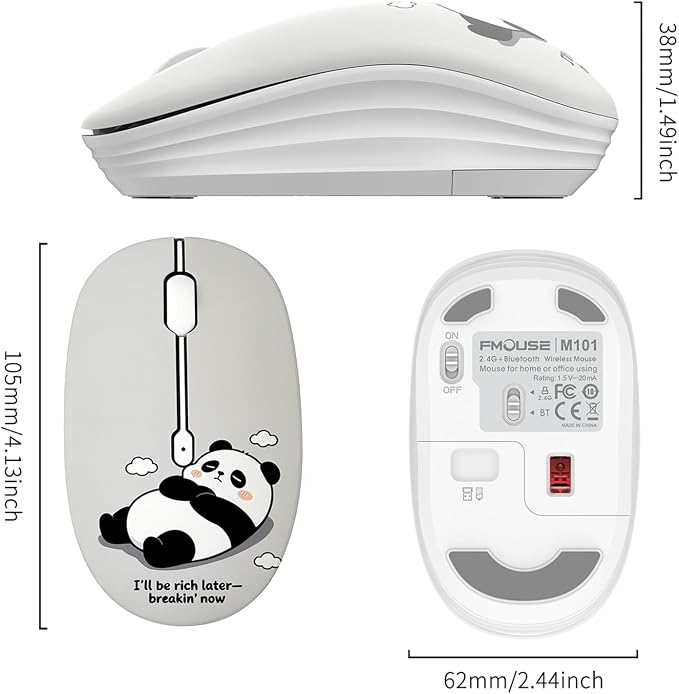
- 【Funny Slack Off Panda Design】 Light grey mouse featuring an adorable lazy panda with the relatable quote "I'll Be Rich Later – Breakin' Now" — ergonomic shape (4.13"×2.44"×1.49", 2.1oz), fits small-to-medium hands. A humorous desk pick for office workers, college students and panda lovers.
- 【Bluetooth 2.4GHz Dual Mode】 USB nano receiver stored in battery compartment for instant plug-and-play on laptops and desktops; Bluetooth for MacBook, iPad, Samsung tablet and slim devices without USB ports. Switch via bottom toggle, auto-reconnects on power-on, stable 33ft range.
- 【Silent Click, Zero Distraction】 Up to 90% quieter than standard mice. 1600 DPI smooth optical tracking on most surfaces, no mousepad needed. Perfect for open office, WFH, dorm, library, café and late-night sessions — click freely without disturbing anyone.
- 【AA Battery Powered, No Cables】 Runs on 1×AA battery (not included). Auto-sleep after 10 minutes idle; ON/OFF switch prevents drain in storage. No charging cable, no downtime — one battery lasts months of daily use.
- 【Wide Compatibility Great Gift】 FMOUSE M101 works with Windows 7/8/10/11, macOS, iPadOS, Android 5.0+, ChromeOS and Linux — MacBook, all-gen iPad, Samsung tablet, Chromebook and all laptops desktops. Great gift for coworkers, college students, Secret Santa and birthdays. Available in multiple designs.
Overview
- Brand : FMOUSE
- Color : Slack Off Panda
- Connectivity Technology : Bluetooth, USB
- Special Feature : Wireless
- Movement Detection Technology : Optical




Work Smarter From Home




WHY WORK BETTER WITH US?

10K+
HAPPY WORKSPACES
10+
HOME OFFICE EXPERIENCE
50+
WORKSPACE COLLECTIONS
1000+
PRODUCTIVITY UPGRADES


WHY UPGRADE YOUR HOME OFFICE?


Home Office Questions
Home Office Tips
-

How to Choose the Best Desk Lamp for Your Home ...
The right desk lamp can improve visibility, reduce distracting screen glare, and create a more comfortable home office. This 2026 guide explains how to choose an LED desk lamp based...
How to Choose the Best Desk Lamp for Your Home ...
The right desk lamp can improve visibility, reduce distracting screen glare, and create a more comfortable home office. This 2026 guide explains how to choose an LED desk lamp based...
-

How to Choose the Best Filing Cabinet for a Mor...
Choosing the right filing cabinet can keep important documents organized, secure, and easy to access while reducing home office clutter. This 2026 buyer’s guide explains how to compare filing cabinet...
How to Choose the Best Filing Cabinet for a Mor...
Choosing the right filing cabinet can keep important documents organized, secure, and easy to access while reducing home office clutter. This 2026 buyer’s guide explains how to compare filing cabinet...
-

How to Choose the Best Foot Rest for Your Home ...
A high-quality foot rest can improve posture, reduce pressure on your legs and lower back, and increase comfort during long workdays. This 2026 buyer's guide explains how to compare ergonomic...
How to Choose the Best Foot Rest for Your Home ...
A high-quality foot rest can improve posture, reduce pressure on your legs and lower back, and increase comfort during long workdays. This 2026 buyer's guide explains how to compare ergonomic...


